Performance Is a Feature
Web performance directly impacts business metrics. Amazon found that every 100ms of latency costs 1% of sales. Google uses Core Web Vitals as a ranking factor. Users abandon slow sites - 53% leave if a mobile page takes longer than 3 seconds to load.
Performance is not a technical concern to address later. It is a feature that requires continuous investment.
Core Web Vitals Explained
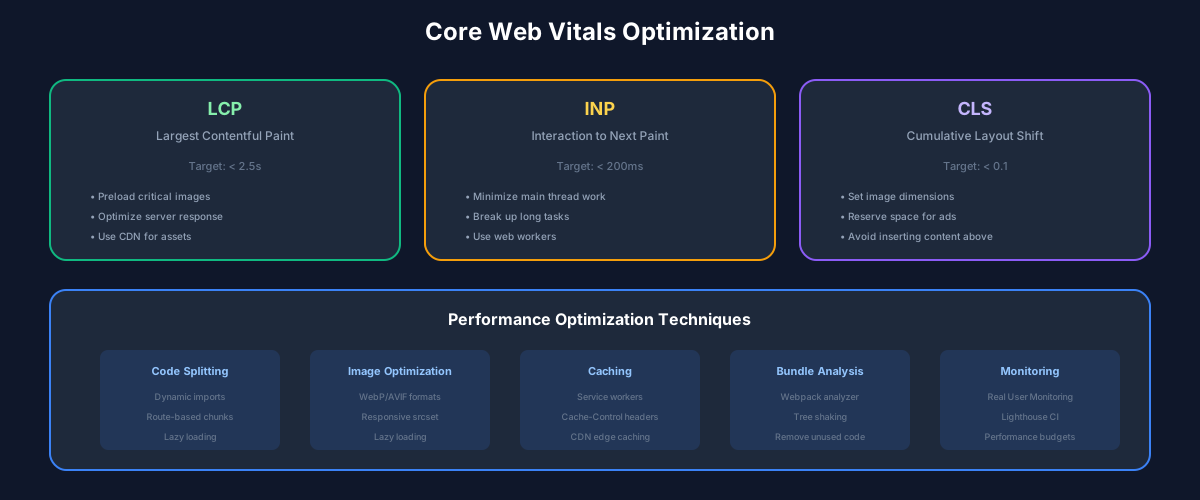
Google's Core Web Vitals measure real user experience:
LCP (Largest Contentful Paint): When does the main content appear? Target: under 2.5 seconds. Usually an image or text block. Optimize by preloading critical resources, using CDNs, and optimizing server response time.
INP (Interaction to Next Paint): How quickly does the page respond to user input? Target: under 200ms. Replaced FID in 2024. Measures the entire interaction, not just input delay. Optimize by breaking up long tasks and minimizing JavaScript execution.
CLS (Cumulative Layout Shift): How much does content jump around? Target: under 0.1. Caused by images without dimensions, dynamically injected content, and web fonts. Prevent by reserving space for dynamic content.
The Loading Waterfall
Understanding the browser loading sequence is essential:
Optimize each stage: inline critical CSS, defer non-critical JavaScript, preload key resources, and reserve space for late-loading content.
Image Optimization Strategy
Images are typically the largest payload on web pages. A comprehensive strategy includes:
Format selection: WebP for most images, AVIF for maximum compression where supported. Use picture element with fallbacks.
Responsive images: Serve appropriate sizes for each viewport. A mobile device does not need a 4K hero image.
Lazy loading: Images below the fold can load later. But never lazy-load the LCP image - mark it as priority.
Placeholders: BlurHash or LQIP (Low-Quality Image Placeholder) prevents CLS while images load.
JavaScript Performance
JavaScript is often the biggest performance bottleneck. Every byte must be parsed, compiled, and executed.
Code splitting: Load only what is needed for the current page. Dynamic imports for routes and heavy components.
Tree shaking: Ensure your bundler eliminates unused code. Avoid side effects in module initialization.
Third-party scripts: Each analytics tool, chat widget, and tracker adds weight. Audit and remove what you do not use. Load remaining scripts asynchronously.
Long tasks: Break up JavaScript execution longer than 50ms. Use requestIdleCallback or scheduler.yield for deferrable work.
Measuring and Monitoring
Lab data (Lighthouse) is useful for development but does not reflect real users. Field data (CrUX, RUM) shows actual user experience.
Implement Real User Monitoring (RUM) to track Core Web Vitals in production. Set performance budgets and alert when they are exceeded. Make performance visible in dashboards alongside other business metrics.
Best Practices
Recommended Reading

💬Discussion
No comments yet
Be the first to share your thoughts!