The 2MB Bundle That Broke Mobile
"Why is the app so slow on my phone?"
You check the bundle analyzer. 2.1MB of JavaScript. For a product listing page. Most of it: your charting library (used on one admin page), date-fns (you use three functions), and the entire component library tree-shaken to... still 400KB.
Your Lighthouse score is 34. On desktop. Mobile users are bouncing before the page finishes hydrating.
"But we're already code-splitting," your tech lead says. You are. It's not enough.
React Server Components solve this problem at its root. Instead of shipping JavaScript to the client and hoping tree-shaking saves you, RSC runs components on the server. They never ship JS to the client at all. That product list? Server Component. Those 47 product cards? Server Components. The only JS that ships: the "Add to Cart" button.
Result: 89KB bundle. Lighthouse score: 94. Same features.
This guide gives you the mental model to make that happen.
The Problem RSC Solves
To understand Server Components, we need to understand the problem they solve.
Traditional React applications run entirely in the browser. When a user visits your page, the browser downloads JavaScript, React hydrates the page, components mount, and then data fetching begins. The user stares at loading spinners while waterfall requests trickle in.
We have invented endless workarounds: server-side rendering, static generation, prefetching, code splitting, lazy loading. Each addresses a symptom without solving the root cause.
The root cause is simple: we are doing work in the wrong place. Fetching data that exists on the server, then sending it to the client, only to render HTML that gets sent back - this is a round trip that adds latency at every step.
Server Components flip this model. Components that only render static content or fetch data run on the server. They never ship JavaScript to the client. They render to HTML (or an efficient streaming format) that arrives ready to display.
The result: faster initial loads, smaller JavaScript bundles, no client-side waterfalls, and simpler code.
The Mental Model: Server vs. Client
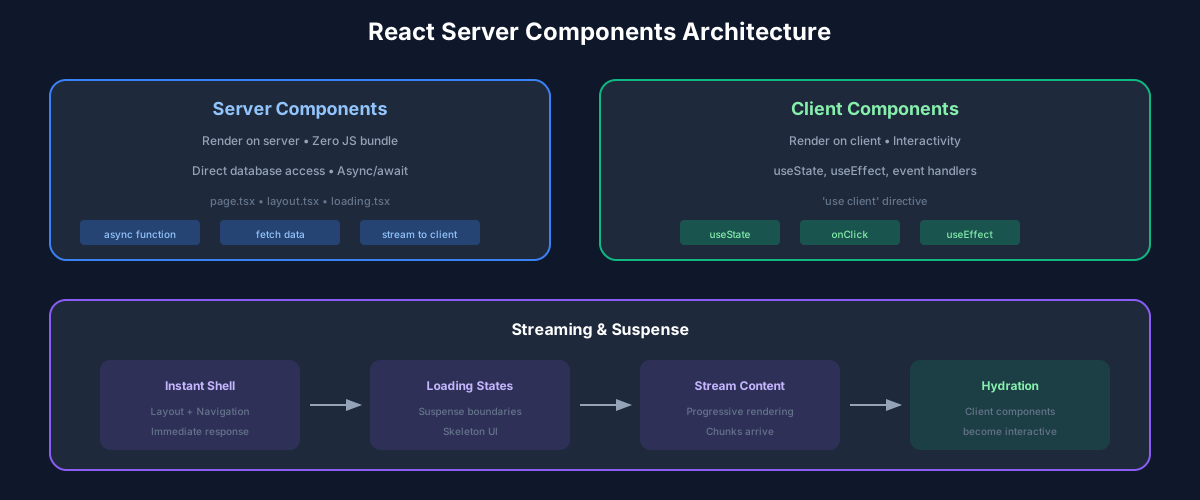
The key insight is simple: every component is either a Server Component or a Client Component, and this distinction determines where it runs.
Server Components (the default in Next.js App Router):
Client Components (marked with 'use client'):
// Server Component (default)
// This component runs on the server and never ships JS to the client
async function ProductList() {
  // Direct database access - no API needed!
  const products = await db.products.findMany({
    where: { inStock: true },
    take: 20
  });

  return (
    <ul>
      {products.map(product => (
        <li key={product.id}>
          <ProductCard product={product} />
        </li>
      ))}
    </ul>
  );
}

// Client Component (for interactivity)
'use client';

import { useState } from 'react';

function AddToCartButton({ productId }: { productId: string }) {
  const [isAdding, setIsAdding] = useState(false);

  const handleClick = async () => {
    setIsAdding(true);
    await addToCart(productId);
    setIsAdding(false);
  };

  return (
    <button onClick={handleClick} disabled={isAdding}>
      {isAdding ? 'Adding...' : 'Add to Cart'}
    </button>
  );
}
The Composition Pattern
Server and Client Components compose naturally, with one critical rule: Server Components can render Client Components, but Client Components cannot import Server Components.
Think of it as a waterfall: server flows to client, not the other way.
// ✅ This works: Server Component renders Client Component
async function ProductPage({ id }: { id: string }) {
  const product = await getProduct(id);

  return (
    <div>
      <h1>{product.name}</h1>
      <p>{product.description}</p>
      <AddToCartButton productId={id} />  {/* Client Component */}
    </div>
  );
}

// ❌ This doesn't work: Client Component importing Server Component
'use client';

import ProductDetails from './ProductDetails'; // Server Component

function ProductModal() {
  const [isOpen, setIsOpen] = useState(false);
  return (
    <Modal isOpen={isOpen}>
      <ProductDetails />  {/* Error! Can't import Server Component */}
    </Modal>
  );
}
The Workaround: Children Pattern
When you need Server Component content inside a Client Component, pass it as children:
// Server Component (parent)
async function ProductPage({ id }: { id: string }) {
  const product = await getProduct(id);

  return (
    <ProductModal>
      {/* This Server Component content is passed as children */}
      <ProductDetails product={product} />
    </ProductModal>
  );
}

// Client Component (wrapper)
'use client';

function ProductModal({ children }: { children: React.ReactNode }) {
  const [isOpen, setIsOpen] = useState(false);

  return (
    <Modal isOpen={isOpen}>
      {children}  {/* Server-rendered content passed through */}
    </Modal>
  );
}
This pattern is everywhere in well-designed RSC applications. Learn to spot where you need it.
Data Fetching: The Simple Way
Server Components make data fetching delightfully simple. No useEffect, no loading states in components, no client-side caching libraries.
// Just... fetch the data
async function Dashboard() {
  const [user, stats, notifications] = await Promise.all([
    getUser(),
    getStats(),
    getNotifications()
  ]);

  return (
    <div>
      <Header user={user} />
      <StatsGrid stats={stats} />
      <NotificationList notifications={notifications} />
    </div>
  );
}
Parallel Data Fetching
Use Promise.all to fetch data in parallel, not in sequence:
// ❌ Sequential - slow
async function Page() {
  const user = await getUser();        // Wait...
  const posts = await getPosts();      // Then wait...
  const comments = await getComments(); // Then wait...
  // Total time: sum of all fetches
}

// ✅ Parallel - fast
async function Page() {
  const [user, posts, comments] = await Promise.all([
    getUser(),
    getPosts(),
    getComments()
  ]);
  // Total time: longest fetch only
}
Colocated Data Fetching
Each component fetches what it needs. No prop drilling data through the tree:
// Each component fetches its own data
async function UserProfile({ userId }: { userId: string }) {
  const user = await getUser(userId);
  return <div>{user.name}</div>;
}

async function UserPosts({ userId }: { userId: string }) {
  const posts = await getPosts(userId);
  return <PostList posts={posts} />;
}

async function UserPage({ userId }: { userId: string }) {
  return (
    <div>
      <UserProfile userId={userId} />
      <UserPosts userId={userId} />
    </div>
  );
}
React deduplicates fetch requests, so if both components fetch the same user, only one request is made.
Streaming and Suspense
Streaming is where RSC truly shines. Instead of waiting for all data before showing anything, stream content as it becomes ready.
import { Suspense } from 'react';

async function Page() {
  return (
    <div>
      {/* Shows immediately */}
      <Header />

      {/* Streams when ready, shows skeleton until then */}
      <Suspense fallback={<StatsSkeleton />}>
        <Stats />
      </Suspense>

      {/* Independent loading state */}
      <Suspense fallback={<FeedSkeleton />}>
        <Feed />
      </Suspense>
    </div>
  );
}

// This component can take its time - it won't block the page
async function Stats() {
  const stats = await getStats(); // Slow query
  return <StatsDisplay stats={stats} />;
}
Nested Suspense
Suspense boundaries are independent. You can nest them for granular loading states:
<Suspense fallback={<PageSkeleton />}>
  <Header />
  <Main>
    <Suspense fallback={<SidebarSkeleton />}>
      <Sidebar />
    </Suspense>
    <Suspense fallback={<ContentSkeleton />}>
      <Content>
        <Suspense fallback={<CommentsSkeleton />}>
          <Comments />
        </Suspense>
      </Content>
    </Suspense>
  </Main>
</Suspense>
Users see content progressively, from fast outer shell to slow inner details.
Caching and Revalidation
Server Component output can be cached for performance.
Static Rendering
By default, routes without dynamic data are statically rendered at build time:
// This page is rendered once at build time
async function AboutPage() {
  const team = await getTeamMembers();
  return <TeamGrid members={team} />;
}
Dynamic Rendering
Routes that use dynamic data render on each request:
// This page renders on every request
async function DashboardPage() {
  const user = await getCurrentUser(); // Requires auth
  return <Dashboard user={user} />;
}
Time-Based Revalidation
Cache responses for a specific duration:
// Revalidate every 60 seconds
async function getProducts() {
  const res = await fetch('https://api.example.com/products', {
    next: { revalidate: 60 }
  });
  return res.json();
}
On-Demand Revalidation
Invalidate cache when data changes:
// In a Server Action or API route
import { revalidatePath, revalidateTag } from 'next/cache';

async function updateProduct(id: string, data: ProductData) {
  await db.products.update({ where: { id }, data });

  // Invalidate specific path
  revalidatePath('/products');

  // Or invalidate by tag
  revalidateTag('products');
}
Server Actions: Mutations Without APIs
Server Actions let you call server functions directly from client components. No API routes needed for simple mutations.
// actions.ts
'use server';

export async function addToCart(productId: string) {
  const user = await getCurrentUser();

  await db.cartItems.create({
    data: {
      userId: user.id,
      productId,
      quantity: 1
    }
  });

  revalidatePath('/cart');
}

export async function updateQuantity(itemId: string, quantity: number) {
  await db.cartItems.update({
    where: { id: itemId },
    data: { quantity }
  });

  revalidatePath('/cart');
}// Client Component using Server Actions
'use client';
import { addToCart } from './actions';
function AddToCartButton({ productId }: { productId: string }) {
const [isPending, startTransition] = useTransition();
return (
<button
disabled={isPending}
onClick={() => {
startTransition(async () => {
await addToCart(productId);
});
}}
>
{isPending ? 'Adding...' : 'Add to Cart'}
</button>
);
}Form Actions
Server Actions work beautifully with forms:
async function ContactForm() {
  async function submitForm(formData: FormData) {
    'use server';

    const email = formData.get('email') as string;
    const message = formData.get('message') as string;

    await sendEmail({ email, message });
    redirect('/thank-you');
  }

  return (
    <form action={submitForm}>
      <input name="email" type="email" required />
      <textarea name="message" required />
      <button type="submit">Send</button>
    </form>
  );
}
Performance Patterns
Minimize Client Components
Every 'use client' directive adds to your JavaScript bundle. Push interactivity to the leaves of your component tree:
// ❌ Entire page is a Client Component
'use client';

function ProductPage() {
  const [quantity, setQuantity] = useState(1);
  // Everything here ships to the client
}

// ✅ Only interactive parts are Client Components
async function ProductPage({ id }: { id: string }) {
  const product = await getProduct(id);

  return (
    <div>
      <ProductInfo product={product} />      {/* Server */}
      <ProductImages images={product.images} /> {/* Server */}
      <QuantitySelector />                    {/* Client - only this ships JS */}
      <AddToCartButton productId={id} />      {/* Client */}
    </div>
  );
}
Prefetching
Next.js prefetches linked routes. Ensure critical routes are prefetched:
import Link from 'next/link';

function Navigation() {
  return (
    <nav>
      <Link href="/products">Products</Link>  {/* Prefetched */}
      <Link href="/about" prefetch={false}>About</Link>  {/* Not prefetched */}
    </nav>
  );
}
Partial Prerendering (Experimental)
Combine static and dynamic content in a single route:
// Static shell renders immediately
// Dynamic parts stream in with Suspense
async function ProductPage({ id }: { id: string }) {
  return (
    <div>
      <StaticHeader />  {/* Prerendered */}
      <Suspense fallback={<PriceSkeleton />}>
        <DynamicPrice productId={id} />  {/* Streams in */}
      </Suspense>
      <StaticFooter />  {/* Prerendered */}
    </div>
  );
}
Common Mistakes and Solutions
Mistake: Making everything a Client Component
When in doubt, developers add 'use client'. This negates RSC benefits.
Solution: Start with Server Components. Only add 'use client' when you need interactivity or browser APIs.
Mistake: Fetching data in Client Components
Old habits die hard. Reaching for useEffect and fetch.
Solution: Lift data fetching to Server Components. Pass data down as props or use the children pattern.
Mistake: Not using Suspense
Without Suspense, slow data blocks the entire page.
Solution: Wrap slow components in Suspense boundaries. Design meaningful loading states.
Mistake: Over-fetching in parent components
Fetching all data at the top and prop-drilling down.
Solution: Let each component fetch what it needs. Trust React's deduplication.
The Path Forward
React Server Components are not optional anymore - they are the foundation of modern React frameworks. Next.js App Router, Remix (with RSC support coming), and future frameworks are built on this model.
The learning curve is real. The mental model is different. But once it clicks, you will wonder how you ever built React apps the old way.
Start small. Convert one page. Feel the difference when your JavaScript bundle shrinks and your page loads faster. Then convert another. Before long, you will be thinking in Server Components by default.
The future of React is here. It runs on the server.
Recommended Reading

💬Discussion
No comments yet
Be the first to share your thoughts!