4:47 AM: "We Have a Problem"
The page comes at 4:47 AM. "Critical security incident. All hands."
By 5:30 AM, you're staring at traffic logs showing data exfiltration from your production database. Customer records. Payment tokens. Everything.
"How did they get in?" your CISO asks.
The answer takes two weeks to find: a dependency of a dependency of a dependency. A logging library you'd never heard of, six levels deep in your node_modules, had been compromised three months ago. It sat in your production code, silently forwarding credentials to an attacker-controlled server.
You didn't install it. You didn't know it existed. Your vulnerability scanner never flagged it. And now you're explaining to regulators why 2.3 million customer records are on the dark web.
This is supply chain security. SolarWinds. Log4Shell. event-stream. Codecov. The attacks keep coming because the attack surface keeps growing. A typical Node.js project with 30 direct dependencies has 1,000+ transitive dependencies. Each one is an attack vector you probably don't know exists.
Defending against supply chain attacks requires a fundamental shift in how we think about software security.
Understanding the Attack Surface
Your software supply chain includes every component and process involved in delivering code to production:
Direct Dependencies: Packages you explicitly install and use. You know about these because you added them to your package.json or requirements.txt.
Transitive Dependencies: Packages your dependencies depend on. You probably do not know about most of these. A typical Node.js project with 30 direct dependencies might have 1,000+ transitive dependencies.
Build Tools: Compilers, bundlers, linters, test frameworks. These execute arbitrary code during your build process.
CI/CD Systems: Jenkins, GitHub Actions, GitLab CI. These have access to secrets, deployment credentials, and production systems.
Container Base Images: The operating system and runtime environment your code runs on. When did you last check what is in your Alpine or Debian base image?
Development Tools: IDEs, plugins, browser extensions. These have access to your source code and potentially your credentials.
Each component is an attack vector. Securing the supply chain means understanding and protecting all of them.
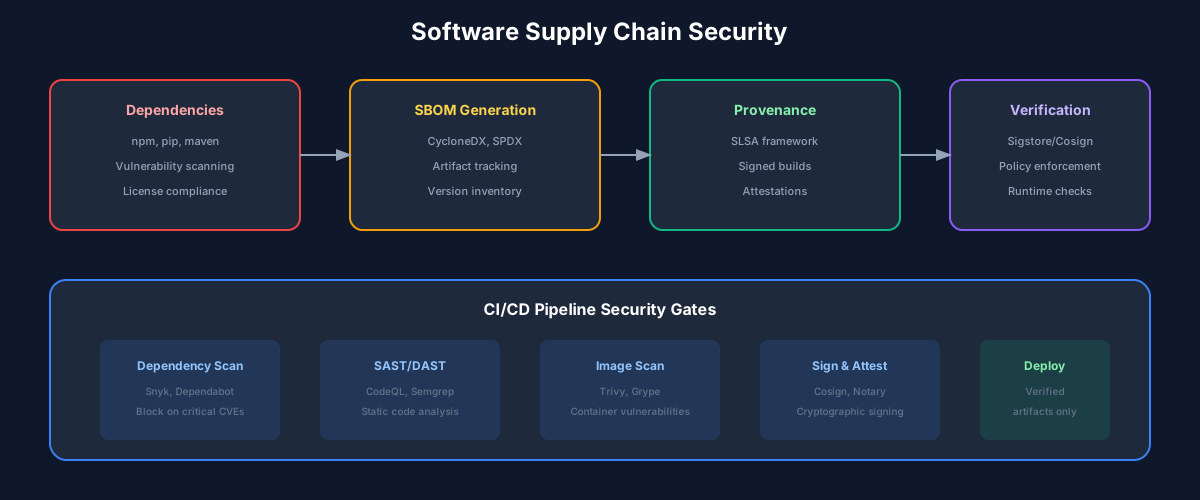
Software Bill of Materials (SBOM)
You cannot protect what you cannot see. The first step in supply chain security is knowing exactly what you are running.
An SBOM is a formal, machine-readable inventory of software components. Think of it like a nutrition label for software - listing every ingredient, where it came from, and its version.
SBOM Formats
Two formats dominate:
SPDX (Software Package Data Exchange): Linux Foundation standard, widely supported, comprehensive metadata.
CycloneDX: OWASP standard, designed for security use cases, supports vulnerability information.
{
  "bomFormat": "CycloneDX",
  "specVersion": "1.4",
  "components": [
    {
      "type": "library",
      "name": "lodash",
      "version": "4.17.21",
      "purl": "pkg:npm/lodash@4.17.21",
      "licenses": [{"id": "MIT"}],
      "hashes": [{
        "alg": "SHA-256",
        "content": "abc123..."
      }]
    }
  ]
}
Generating SBOMs
Generate SBOMs as part of your build process:
# GitHub Actions example
- name: Generate SBOM
  uses: anchore/sbom-action@v0
  with:
    path: .
    format: cyclonedx-json
    output-file: sbom.json

- name: Upload SBOM
  uses: actions/upload-artifact@v3
  with:
    name: sbom
    path: sbom.json
SBOM Usage
Once you have SBOMs, you can:
Dependency Scanning
With visibility comes the ability to detect problems. Dependency scanning identifies known vulnerabilities in your components.
Vulnerability Databases
Scanners check components against vulnerability databases:
Scanner Integration
Integrate scanning into multiple stages:
# Pre-commit: Check before code is committed
pre-commit:
  - name: dependency-check
    run: npm audit --audit-level=high

# PR Check: Block merges with critical vulnerabilities
pr-check:
  - name: snyk-test
    run: snyk test --severity-threshold=high

# Build: Generate vulnerability report
build:
  - name: trivy-scan
    run: trivy fs --severity HIGH,CRITICAL .

# Deploy Gate: Final check before production
deploy:
  - name: verify-sbom
    run: grype sbom:sbom.json --fail-on high
Handling Vulnerabilities
Not every vulnerability needs immediate action:
interface VulnerabilityAssessment {
  cve: string;
  severity: 'CRITICAL' | 'HIGH' | 'MEDIUM' | 'LOW';
  affectedComponent: string;
  reachable: boolean;        // Is vulnerable code path reachable?
  exploitable: boolean;      // Are preconditions for exploit met?
  patchAvailable: boolean;   // Is there a fix?
  workaroundAvailable: boolean;
  riskAccepted: boolean;     // Explicit acceptance with justification
}

function prioritizeVulnerabilities(
  vulns: VulnerabilityAssessment[]
): VulnerabilityAssessment[] {
  return vulns
    .filter(v => !v.riskAccepted)
    .sort((a, b) => {
      // Critical + exploitable + reachable = fix immediately
      const scoreA = calculateRiskScore(a);
      const scoreB = calculateRiskScore(b);
      return scoreB - scoreA;
    });
}
Artifact Signing and Verification
How do you know the package you downloaded is the one the maintainer published? Artifact signing provides cryptographic proof of authenticity.
Sigstore: The Modern Approach
Sigstore provides keyless signing using identity-based certificates:
# Sign a container image
cosign sign --oidc-issuer=https://oauth2.sigstore.dev/auth \
  myregistry.io/myimage:v1.0.0

# Verify before deploying
cosign verify --certificate-identity=release@mycompany.com \
  --certificate-oidc-issuer=https://oauth2.sigstore.dev/auth \
  myregistry.io/myimage:v1.0.0
Kubernetes Admission Control
Enforce signature verification in your cluster:
apiVersion: policy.sigstore.dev/v1alpha1
kind: ClusterImagePolicy
metadata:
  name: require-signatures
spec:
  images:
    - glob: "myregistry.io/**"
  authorities:
    - keyless:
        identities:
          - issuer: https://oauth2.sigstore.dev/auth
            subject: release@mycompany.com
npm Package Provenance
npm now supports provenance attestations:
# Publish with provenance (from GitHub Actions)
npm publish --provenance

# Verify package provenance
npm audit signatures
Securing the Build Process
Your build system is a high-value target. It has access to source code, secrets, and deployment credentials.
Hermetic Builds
Hermetic builds are isolated and reproducible - they cannot access the network or any resources not explicitly declared:
# Bazel BUILD file with hermetic dependencies
load("@rules_python//python:pip.bzl", "pip_parse")

pip_parse(
    name = "pip_deps",
    requirements_lock = "//third_party:requirements_lock.txt",
)

py_binary(
    name = "myapp",
    srcs = ["main.py"],
    deps = ["@pip_deps//requests"],
)
Immutable Build Environments
Use containers for builds with pinned, verified base images:
# Pin to digest, not tag
FROM node:20-alpine@sha256:abc123...

# Verify base image
RUN cosign verify node:20-alpine@sha256:abc123...

# Install dependencies from lockfile only
COPY package-lock.json .
RUN npm ci --ignore-scripts

# Build application
COPY . .
RUN npm run build
Least-Privilege CI/CD
Minimize what your CI/CD system can access:
# GitHub Actions with minimal permissions
permissions:
  contents: read
  packages: write

jobs:
  build:
    runs-on: ubuntu-latest
    steps:
      - uses: actions/checkout@v4

      # Use OIDC for cloud authentication instead of long-lived secrets
      - uses: aws-actions/configure-aws-credentials@v4
        with:
          role-to-assume: arn:aws:iam::123456789:role/github-actions
          aws-region: us-east-1
Dependency Management Practices
Secure dependency management reduces your attack surface.
Lock Files Are Non-Negotiable
Lock files pin exact versions of all dependencies, including transitive ones:
# Always commit lock files
git add package-lock.json  # npm
git add yarn.lock          # yarn
git add pnpm-lock.yaml     # pnpm
git add poetry.lock        # python poetry
git add Cargo.lock         # rust

# Install from lockfile in CI
npm ci          # Not npm install
yarn --frozen-lockfile
pnpm install --frozen-lockfile
Automated Updates with Review
Use tools like Dependabot or Renovate for automated updates, but with review:
# renovate.json
{
  "extends": ["config:base"],
  "packageRules": [
    {
      "matchUpdateTypes": ["patch"],
      "automerge": true,
      "automergeType": "branch"
    },
    {
      "matchUpdateTypes": ["minor"],
      "automerge": false,
      "reviewers": ["security-team"]
    },
    {
      "matchUpdateTypes": ["major"],
      "automerge": false,
      "reviewers": ["security-team", "architecture-team"]
    }
  ]
}
Vendoring for Critical Applications
For high-security applications, vendor dependencies:
# Go vendoring
go mod vendor
git add vendor/

# Node.js (less common but possible)
npm pack <dependency>
# Store tarballs in your repo
Vendoring trades disk space for supply chain independence - you control exactly what code runs.
Monitoring and Response
Security is not a one-time achievement. It requires continuous monitoring and incident response capabilities.
Continuous Monitoring
interface SupplyChainMonitoring {
  // New vulnerabilities in deployed components
  vulnerabilityAlerts: Alert[];

  // Changes to dependencies outside normal update process
  unexpectedChanges: Change[];

  // Packages with maintainer changes or suspicious activity
  reputationAlerts: Alert[];

  // Build process anomalies
  buildAnomalies: Anomaly[];
}

async function monitorSupplyChain(): Promise<SupplyChainMonitoring> {
  const deployedSboms = await getDeployedSboms();

  return {
    vulnerabilityAlerts: await checkNewVulnerabilities(deployedSboms),
    unexpectedChanges: await detectUnauthorizedChanges(deployedSboms),
    reputationAlerts: await checkPackageReputation(deployedSboms),
    buildAnomalies: await analyzeBuildLogs()
  };
}
Incident Response Playbook
When a supply chain incident occurs:
# Search all SBOMs for affected package
   grype db update
   for sbom in sboms/*.json; do
     grype sbom:$sbom --only-fixed | grep "CVE-2024-XXXX"
doneBuilding a Security Culture
Tools and processes only work when people use them. Building a security culture is essential.
Make Security Easy
Developers will take shortcuts if security is painful:
# Good: Security checks are automatic and fast
- name: Security Scan
  run: trivy fs . --exit-code 1 --severity CRITICAL
  timeout-minutes: 2

# Bad: Manual process developers will skip
# "Remember to run the security scan before merging"
Provide Clear Guidance
When vulnerabilities are found, tell developers exactly what to do:
CRITICAL: CVE-2024-1234 in lodash@4.17.19

What: Prototype pollution allowing remote code execution
Risk: High - publicly exploited
Fix: Upgrade to lodash@4.17.21

Steps:
1. npm update lodash
2. Run tests: npm test
3. Verify fix: npm audit

Questions? #security-help on Slack
Celebrate Security Work
Security work is often invisible. Make it visible:
The Road Ahead
Supply chain security is evolving rapidly:
Regulatory Requirements: Government mandates (US Executive Order 14028, EU Cyber Resilience Act) are making SBOMs and attestations mandatory for many organizations.
Transparency Logs: Sigstore's Rekor and similar systems create immutable records of software artifacts, enabling detection of tampering.
Build Provenance: SLSA (Supply-chain Levels for Software Artifacts) provides a framework for progressively hardening build processes.
AI-Assisted Security: ML models are improving at detecting anomalous dependencies and suspicious package behavior.
The attackers are sophisticated and patient. They are looking for the weakest link in your supply chain. Your job is to ensure there are no weak links - or at least that you will detect and respond when one is exploited.
Supply chain security is not optional. It is not a nice-to-have. It is a fundamental requirement for shipping software responsibly. Start with visibility (SBOMs), add detection (scanning), enforce integrity (signing), and build the muscle memory to respond quickly. The alternative is waiting to be the next headline.
Recommended Reading
💬Discussion
No comments yet
Be the first to share your thoughts!