SecurityJanuary 7, 2026

Ransomware Defense for DevOps: Protecting Your Pipeline

Protect CI/CD pipelines and infrastructure from ransomware with backup strategies, incident response, and recovery patterns.

DT

Dev Team

14 min read

#ransomware#backup#incident-response#recovery#devops
Ransomware Defense for DevOps: Protecting Your Pipeline

Ransomware Targets Infrastructure

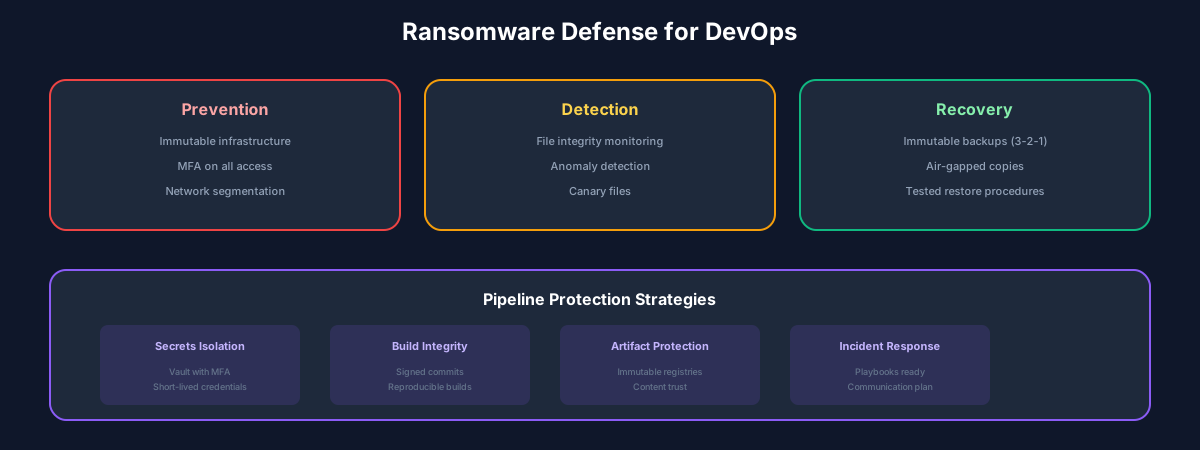
Ransomware attacks have evolved beyond encrypting individual workstations. Modern attacks specifically target backups, CI/CD pipelines, and infrastructure-as-code repositories. If attackers can encrypt your deployment pipeline, they can demand payment to restore your ability to ship code.

DevOps teams are particularly valuable targets because they hold the keys to production systems, have elevated privileges, and often prioritize velocity over security.

The 3-2-1-1-0 Backup Strategy

The classic 3-2-1 rule has evolved for the ransomware era:

  • 3 copies of your data
  • 2 different storage types (disk, tape, cloud)
  • 1 copy offsite
  • 1 copy offline or air-gapped
  • 0 errors (verified through regular restore tests)
  • The critical addition is the offline copy. If backups are network-accessible, ransomware can encrypt them too. Air-gapped or immutable backups are your last line of defense.

    Immutable Backups

    Immutability ensures that once written, backup data cannot be modified or deleted, even by administrators. This defeats ransomware that attempts to encrypt or destroy backups.

    Implementation options:

  • AWS S3 Object Lock with Governance or Compliance mode
  • Azure Blob Immutable Storage
  • Dedicated backup appliances with WORM storage
  • Write-once tape media
  • Retention periods should exceed your detection time. If it takes 30 days to discover a compromise, you need at least 30 days of immutable backups.

    Protecting the Pipeline

    Your CI/CD pipeline is infrastructure-as-code for attackers. Compromising it gives persistent access to production. Protect it accordingly:

  • Store pipeline configurations in version control with required reviews
  • Use ephemeral build agents that are destroyed after each job
  • Implement least-privilege access to deployment credentials
  • Monitor for unauthorized pipeline modifications
  • Maintain offline copies of critical pipeline configurations
  • Incident Response Playbook

    When ransomware strikes, speed matters. Have a documented, practiced response plan:

    Hour 1: Contain

  • Isolate affected systems from the network
  • Preserve volatile evidence before shutdown
  • Activate incident response team
  • Hours 2-4: Assess

  • Determine scope of encryption
  • Identify patient zero and attack vector
  • Evaluate backup integrity
  • Hours 4-24: Decide

  • Can you recover from backups?
  • What is the business impact of downtime?
  • Engage law enforcement and legal counsel
  • Days 2+: Recover

  • Restore from verified clean backups
  • Rebuild compromised systems from scratch
  • Implement additional controls
  • Best Practices

  • Test restores regularly: Untested backups are not backups
  • Segment networks: Limit lateral movement
  • Patch promptly: Most ransomware exploits known vulnerabilities
  • Train everyone: Phishing remains the top entry vector
  • Monitor for encryption: Detect rapid file modifications
  • Practice incident response: Tabletop exercises quarterly
  • Never pay without expert guidance: Payment does not guarantee recovery
  • Share this article

    💬Discussion

    🗨️

    No comments yet

    Be the first to share your thoughts!
    Related Articles