"Where Did You Get That Information?"
Your AI chatbot just told a customer that your premium plan includes unlimited API calls. It doesn't. Never has.
"Where did you get that information?" your support lead asks, staring at the chat transcript.
The answer: nowhere. The model hallucinated it. Confidently. In a way that sounds completely plausible. Now you have a customer expecting features that don't exist and a legal team asking hard questions.
This is the knowledge problem. LLMs are remarkable at reasoning, but their knowledge is frozen at training time. Ask about last week's events - hallucination. Ask about your internal docs - hallucination. Ask for citations - invented references that don't exist.
RAG (Retrieval-Augmented Generation) fixes this by changing how we use language models. Instead of asking the model to recall information, we retrieve relevant documents at query time and include them in the prompt. The model becomes a reasoning engine over provided context, not a knowledge oracle.
Suddenly your AI can access yesterday's information. It can work with proprietary documents. It can cite real sources. And you can update its knowledge without retraining.
Here's how to build RAG systems that actually work in production.
How RAG Works: The Mental Model
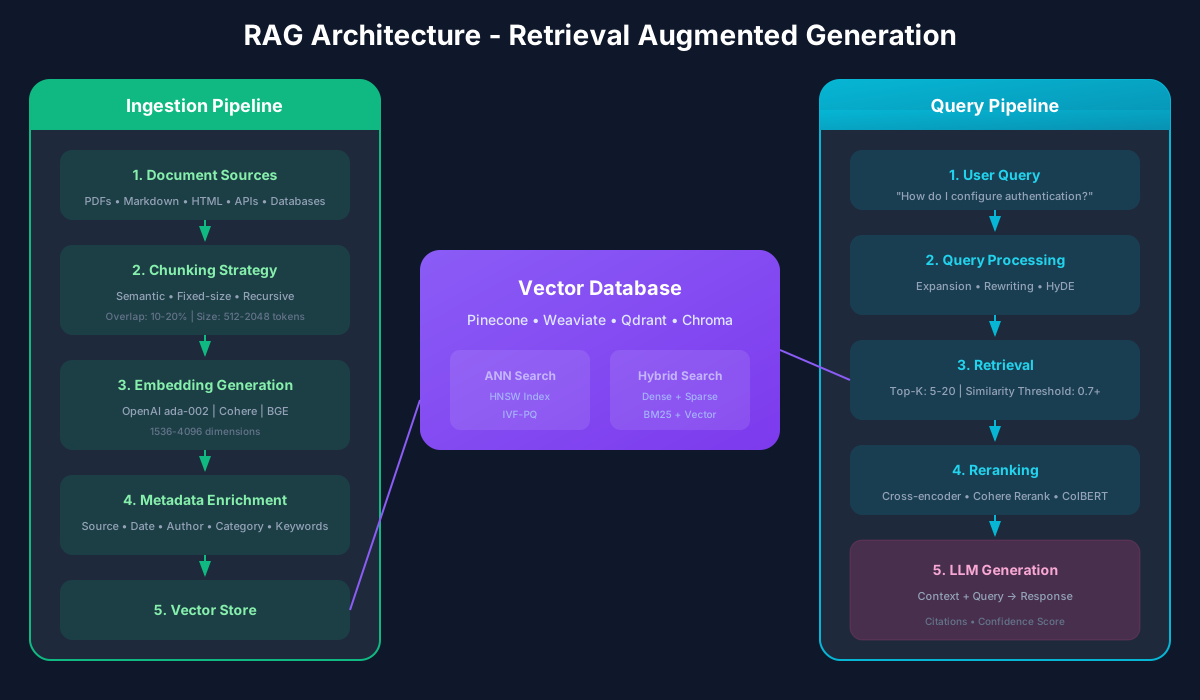
Understanding RAG requires understanding two distinct phases: indexing and retrieval.
The Indexing Phase happens offline, before any user queries. You take your knowledge base - documents, articles, database records, whatever - and process it into a format optimized for retrieval:
The Retrieval Phase happens at query time:
The magic is in step 2. Semantic similarity search finds relevant content even when the exact words differ. A query about "authentication" will find documents discussing "login," "credentials," and "identity verification" - because in the embedding space, these concepts are neighbors.
Chunking: The Underrated Art
Chunking seems straightforward - just split documents into smaller pieces, right? In practice, chunking strategy has enormous impact on retrieval quality, and getting it right requires thought.
The Chunking Dilemma
Small chunks are more precise. A 200-token chunk about authentication will be highly relevant to authentication queries and will not dilute the context with unrelated information.
But small chunks lose context. A chunk that says "this approach significantly improves performance" is useless without knowing what "this approach" refers to. Context that spans multiple chunks gets fragmented.
Large chunks preserve context but reduce precision. A 2000-token chunk might contain a paragraph about authentication buried in discussion of other topics. It will be retrieved for authentication queries, but most of the chunk will be noise.
Chunking Strategies
Fixed-Size Chunking is the simplest approach. Split every N tokens with some overlap to preserve context at boundaries:
function fixedSizeChunk(text: string, chunkSize: number, overlap: number): string[] {
  const tokens = tokenize(text);
  const chunks: string[] = [];

  for (let i = 0; i < tokens.length; i += chunkSize - overlap) {
    const chunk = tokens.slice(i, i + chunkSize);
    chunks.push(detokenize(chunk));
  }

  return chunks;
}
Simple, but it ignores document structure. You might split mid-sentence or separate a heading from its content.
Semantic Chunking respects document structure. Split on paragraph boundaries, section headers, or other natural breakpoints:
function semanticChunk(document: Document): Chunk[] {
  const chunks: Chunk[] = [];

  for (const section of document.sections) {
    // Keep section headers with their content
    let currentChunk = `## ${section.title}\n\n`;

    for (const paragraph of section.paragraphs) {
      if (tokenCount(currentChunk + paragraph) > MAX_CHUNK_SIZE) {
        chunks.push({ content: currentChunk, metadata: section.metadata });
        currentChunk = `## ${section.title} (continued)\n\n`;
      }
      currentChunk += paragraph + '\n\n';
    }

    if (currentChunk.trim()) {
      chunks.push({ content: currentChunk, metadata: section.metadata });
    }
  }

  return chunks;
}
Recursive Chunking handles nested structures by splitting at progressively finer levels until chunks fit the size limit:
const splitters = [
  '\n\n\n',  // Major sections
  '\n\n',     // Paragraphs
  '\n',        // Lines
  '. ',         // Sentences
  ' ',          // Words
];

function recursiveChunk(text: string, maxSize: number, level: number = 0): string[] {
  if (tokenCount(text) <= maxSize) {
    return [text];
  }

  if (level >= splitters.length) {
    // Hard split if nothing else works
    return fixedSizeChunk(text, maxSize, 0);
  }

  const parts = text.split(splitters[level]);
  const chunks: string[] = [];
  let current = '';

  for (const part of parts) {
    if (tokenCount(current + splitters[level] + part) <= maxSize) {
      current += (current ? splitters[level] : '') + part;
    } else {
      if (current) chunks.push(...recursiveChunk(current, maxSize, level + 1));
      current = part;
    }
  }

  if (current) chunks.push(...recursiveChunk(current, maxSize, level + 1));
  return chunks;
}
Practical Recommendations
After much experimentation, here is what works:
Embeddings: Meaning in Numbers
Embeddings are the secret sauce that makes semantic search possible. They transform text into dense vectors where similar meanings cluster together.
How Embeddings Work
An embedding model takes text (a word, sentence, or paragraph) and outputs a vector - typically 384 to 1536 dimensions. These models are trained so that semantically similar texts produce similar vectors.
The magic is that this similarity captures meaning, not just word overlap. The embedding for "The CEO resigned yesterday" will be similar to "The company's leader stepped down recently" despite sharing almost no words.
Choosing an Embedding Model
Several factors matter:
Dimension Count: Higher dimensions can capture more nuance but require more storage and computation. 768-1536 dimensions work well for most applications.
Training Data: Models trained on specific domains (code, legal, medical) often outperform general-purpose models in those domains.
Sequence Length: Some models truncate at 512 tokens; others handle 8192+. Match to your chunk sizes.
Performance: Embedding latency matters for real-time applications. Some models are 10x faster than others.
Popular choices include:
// OpenAI embeddings - excellent quality, API cost
const openaiEmbedding = {
  model: 'text-embedding-3-large',
  dimensions: 3072,
  maxTokens: 8191
};

// Cohere - good multilingual support
const cohereEmbedding = {
  model: 'embed-english-v3.0',
  dimensions: 1024,
  maxTokens: 512
};

// Open source - no API costs, self-hosted
const sentenceTransformer = {
  model: 'all-MiniLM-L6-v2',
  dimensions: 384,
  maxTokens: 256
};
Embedding Best Practices
async function embedBatch(texts: string[], batchSize: number = 100): Promise<number[][]> {
  const embeddings: number[][] = [];

  for (let i = 0; i < texts.length; i += batchSize) {
    const batch = texts.slice(i, i + batchSize);
    const response = await openai.embeddings.create({
      model: 'text-embedding-3-small',
      input: batch
    });
    embeddings.push(...response.data.map(d => d.embedding));
  }

  return embeddings;
}
Vector Databases: Where Knowledge Lives
Vector databases are specialized systems for storing and searching embeddings. They make the "find similar vectors" operation fast - typically milliseconds even with millions of vectors.
Vector Database Options
Pinecone: Fully managed, easy to start, scales well. Good default choice for production.
import { Pinecone } from '@pinecone-database/pinecone';

const pinecone = new Pinecone({ apiKey: process.env.PINECONE_API_KEY });
const index = pinecone.index('knowledge-base');

// Upsert vectors
await index.upsert([{
  id: 'doc-1-chunk-3',
  values: embedding,
  metadata: { source: 'handbook.pdf', page: 42 }
}]);

// Query
const results = await index.query({
  vector: queryEmbedding,
  topK: 10,
  includeMetadata: true,
  filter: { source: { $eq: 'handbook.pdf' } }
});Weaviate: Open source, supports hybrid search natively, has built-in vectorization.
Qdrant: Open source, excellent filtering capabilities, efficient memory usage.
pgvector: PostgreSQL extension. Good if you want to keep everything in Postgres.
-- pgvector setup
CREATE EXTENSION vector;

CREATE TABLE documents (
  id SERIAL PRIMARY KEY,
  content TEXT,
  embedding vector(1536),
  metadata JSONB
);

CREATE INDEX ON documents USING ivfflat (embedding vector_cosine_ops)
  WITH (lists = 100);

-- Query
SELECT id, content, 1 - (embedding <=> $1) AS similarity
FROM documents
ORDER BY embedding <=> $1
LIMIT 10;
Indexing Strategies
Vector search speed depends on the index algorithm:
Flat/Brute Force: Compares query against every vector. Exact results but slow at scale.
IVF (Inverted File): Clusters vectors and only searches relevant clusters. Fast but may miss some results.
HNSW (Hierarchical Navigable Small World): Graph-based navigation. Excellent speed-accuracy tradeoff.
For most production systems, HNSW provides the best balance. Pinecone and most managed services use it automatically.
Hybrid Search: Best of Both Worlds
Pure semantic search has a weakness: it can miss exact keyword matches. If a user searches for "error code 4532" they need documents containing that exact code, not documents semantically similar to error concepts.
Hybrid search combines semantic search with traditional keyword search:
async function hybridSearch(query: string, options: SearchOptions): Promise<SearchResult[]> {
  // Parallel semantic and keyword search
  const [semanticResults, keywordResults] = await Promise.all([
    semanticSearch(query, options.topK),
    keywordSearch(query, options.topK)
  ]);

  // Reciprocal Rank Fusion to combine results
  const scores = new Map<string, number>();
  const k = 60; // RRF constant

  semanticResults.forEach((result, rank) => {
    const current = scores.get(result.id) || 0;
    scores.set(result.id, current + 1 / (k + rank));
  });

  keywordResults.forEach((result, rank) => {
    const current = scores.get(result.id) || 0;
    scores.set(result.id, current + 1 / (k + rank));
  });

  // Sort by combined score
  return Array.from(scores.entries())
    .sort((a, b) => b[1] - a[1])
    .slice(0, options.topK)
    .map(([id, score]) => ({ id, score }));
}
Many vector databases now support hybrid search natively. Weaviate, for example, lets you specify the balance:
const results = await client.graphql.get()
  .withClassName('Document')
  .withHybrid({
    query: 'authentication best practices',
    alpha: 0.75  // 75% semantic, 25% keyword
  })
  .withLimit(10)
  .do();
Retrieval Quality: The Make-or-Break Factor
Retrieval quality determines RAG quality. If you retrieve irrelevant chunks, the best LLM in the world cannot produce good answers.
Measuring Retrieval Quality
Precision: What percentage of retrieved chunks are actually relevant?
Recall: What percentage of relevant chunks were retrieved?
Mean Reciprocal Rank (MRR): How high do relevant results rank?
Build an evaluation set of queries with known relevant documents, and track these metrics:
interface RetrievalEval {
  query: string;
  relevantDocIds: string[];
}

function evaluateRetrieval(
  results: SearchResult[],
  eval: RetrievalEval
): { precision: number; recall: number; mrr: number } {
  const retrieved = new Set(results.map(r => r.id));
  const relevant = new Set(eval.relevantDocIds);

  const truePositives = [...retrieved].filter(id => relevant.has(id)).length;

  const precision = truePositives / retrieved.size;
  const recall = truePositives / relevant.size;

  // Find rank of first relevant result
  const firstRelevantRank = results.findIndex(r => relevant.has(r.id));
  const mrr = firstRelevantRank >= 0 ? 1 / (firstRelevantRank + 1) : 0;

  return { precision, recall, mrr };
}
Improving Retrieval
async function expandedSearch(query: string): Promise<SearchResult[]> {
  const expansions = await llm.complete({
    prompt: `Generate 3 alternative phrasings of this search query: "${query}"
    Output as JSON array of strings.`
  });

  const allQueries = [query, ...JSON.parse(expansions)];
  const allResults = await Promise.all(allQueries.map(q => search(q)));

  return fuseResults(allResults);
}async function searchWithReranking(query: string, topK: number): Promise<SearchResult[]> {
// Get more candidates than needed
const candidates = await semanticSearch(query, topK * 3);
// Rerank with cross-encoder
const reranked = await reranker.rank(
query,
candidates.map(c => c.content)
);
return reranked.slice(0, topK);
}Generation: Turning Context into Answers
Once you have retrieved relevant chunks, you need to generate a response that uses them effectively.
Prompt Structure
A well-structured RAG prompt has clear sections:
function buildRAGPrompt(query: string, chunks: Chunk[]): string {
  const context = chunks
    .map((c, i) => `[Source ${i + 1}: ${c.metadata.title}]\n${c.content}`)
    .join('\n\n---\n\n');

  return `You are a helpful assistant that answers questions based on the provided context.

CONTEXT:
${context}

INSTRUCTIONS:
- Answer the question based ONLY on the context provided
- If the context doesn't contain enough information, say so
- Cite sources using [Source N] notation
- Be concise but complete

QUESTION: ${query}

ANSWER:`;
}
Handling Insufficient Context
Sometimes retrieved chunks do not contain the answer. The model should acknowledge this rather than hallucinate:
const prompt = `...
If the context does not contain information to answer the question, respond with:
"I don't have enough information in my knowledge base to answer this question.
The available documents discuss [brief summary of what IS available],
but don't cover [what the user asked about]."
...`;
Citation and Attribution
For trustworthiness, responses should cite sources:
interface RAGResponse {
  answer: string;
  citations: Citation[];
  confidence: number;
}

interface Citation {
  sourceId: string;
  title: string;
  excerpt: string;
  relevance: number;
}
Production Considerations
Building RAG for production requires attention to several additional concerns.
Latency Budget
RAG adds latency: embedding the query, searching the vector DB, and including context in the prompt. A typical breakdown:
To meet user expectations:
Cost Management
RAG costs come from embeddings, vector database operations, and longer prompts (more context = more tokens):
interface RAGCostEstimate {
  embeddingCost: number;    // Per query
  vectorSearchCost: number; // Per query
  llmCost: number;          // Depends on context size
  storageCost: number;      // Monthly, based on corpus size
}

function estimateCost(config: RAGConfig): RAGCostEstimate {
  const embeddingCost = 0.0001; // $0.0001 per 1K tokens
  const vectorSearchCost = config.vectorDB.costPerQuery;
  const llmCost = (config.contextTokens + config.avgResponseTokens) * 0.00003;
  const storageCost = config.corpusSize * config.vectorDB.costPerGB;

  return { embeddingCost, vectorSearchCost, llmCost, storageCost };
}
Keeping Knowledge Fresh
Your knowledge base is only valuable if it stays current:
async function incrementalIndexUpdate(changes: DocumentChange[]): Promise<void> {
  for (const change of changes) {
    switch (change.type) {
      case 'create':
      case 'update':
        const chunks = await chunkDocument(change.document);
        const embeddings = await embedBatch(chunks.map(c => c.content));
        await vectorDB.upsert(chunks.map((c, i) => ({
          id: `${change.documentId}-${i}`,
          values: embeddings[i],
          metadata: c.metadata
        })));
        break;

      case 'delete':
        await vectorDB.deleteByFilter({
          documentId: change.documentId
        });
        break;
    }
  }
}
Measuring Success
Track these metrics to know if your RAG system is working:
Retrieval Metrics
Quality Metrics
Business Metrics
Common Pitfalls and Solutions
Pitfall: Retrieving irrelevant chunks
Solution: Improve chunking, tune similarity thresholds, add reranking
Pitfall: Missing information that exists in the corpus
Solution: Better chunking to avoid fragmentation, query expansion, hybrid search
Pitfall: Model ignoring context and hallucinating
Solution: Stronger prompting, explicit instruction to cite sources, lower temperature
Pitfall: Context window overflow
Solution: Smarter chunk selection, summarization of retrieved content, longer context models
Pitfall: Stale information
Solution: Automated index updates, metadata filtering by date, source freshness signals
The Future of RAG
RAG is evolving rapidly. Trends to watch:
But the fundamentals will not change: understand your documents, chunk them thoughtfully, embed them accurately, retrieve them efficiently, and generate responses that users can trust.
RAG is not just a technique - it is the bridge between the vast knowledge locked in your documents and the reasoning power of large language models. Build that bridge well, and you unlock tremendous value.
Recommended Reading

Building LLM Powered Applications
by Valentina Alto
Create intelligent apps and agents with large language models
As an Amazon Associate, we earn from qualifying purchases.
Designing Machine Learning Systems
by Chip Huyen
ML systems design for production
As an Amazon Associate, we earn from qualifying purchases.
💬Discussion
No comments yet
Be the first to share your thoughts!