What is MCP?
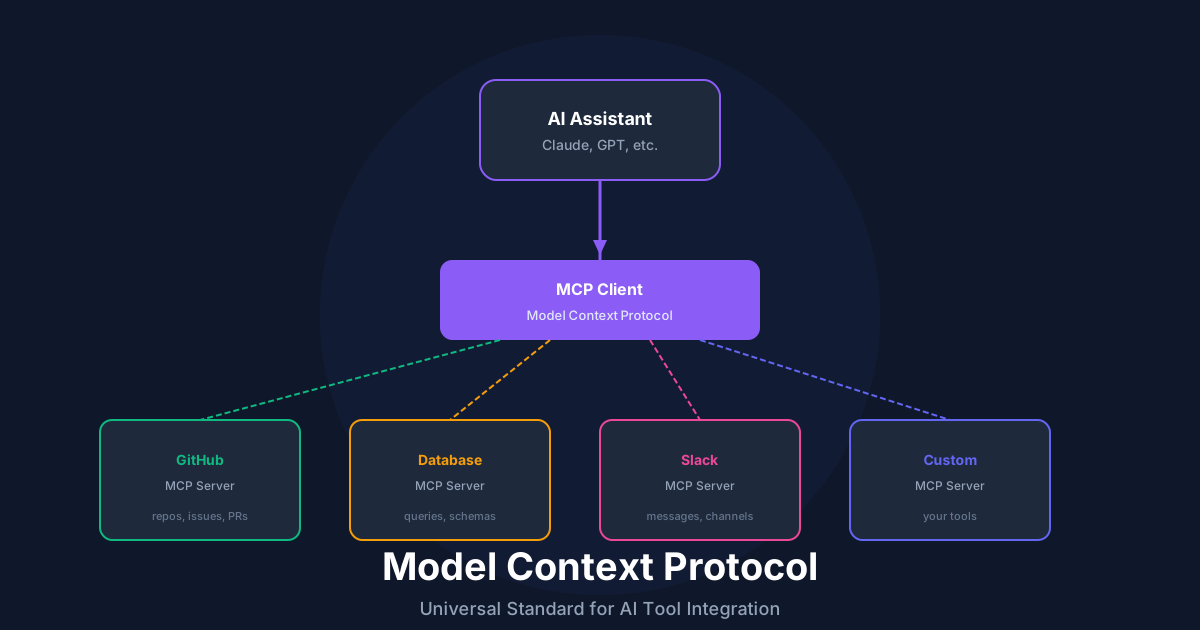
The Model Context Protocol (MCP) is an open standard for connecting AI systems with external tools and data sources. Think of it as USB for AI - a universal interface that lets any AI assistant use any tool.
Key Benefits
MCP Architecture
Plain Text
┌─────────────────┐     ┌─────────────────┐
│   AI Assistant  │────▶│   MCP Client    │
│  (Claude, GPT)  │     │                 │
└─────────────────┘     └────────┬────────┘
                                 │
                    ┌────────────┼────────────┐
                    │            │            │
              ┌─────▼─────┐ ┌────▼────┐ ┌─────▼─────┐
              │MCP Server │ │MCP Server│ │MCP Server │
              │ (GitHub)  │ │ (Jira)   │ │ (Custom)  │
              └───────────┘ └──────────┘ └───────────┘
Building an MCP Server
Server Setup
TypeScript
import { Server } from '@modelcontextprotocol/sdk/server/index.js';
import { StdioServerTransport } from '@modelcontextprotocol/sdk/server/stdio.js';

const server = new Server(
  {
    name: 'my-custom-tools',
    version: '1.0.0',
  },
  {
    capabilities: {
      tools: {},
      resources: {},
    },
  }
);

// Start the server
const transport = new StdioServerTransport();
await server.connect(transport);
Defining Tools
TypeScript
import { z } from 'zod';

// Tool schema
const CreateIssueSchema = z.object({
  title: z.string().describe('Issue title'),
  description: z.string().describe('Detailed description'),
  priority: z.enum(['low', 'medium', 'high']).describe('Issue priority'),
  labels: z.array(z.string()).optional().describe('Labels to apply'),
});

// Register tool
server.setRequestHandler('tools/list', async () => ({
  tools: [
    {
      name: 'create_issue',
      description: 'Create a new issue in the project tracker',
      inputSchema: {
        type: 'object',
        properties: {
          title: { type: 'string', description: 'Issue title' },
          description: { type: 'string', description: 'Detailed description' },
          priority: {
            type: 'string',
            enum: ['low', 'medium', 'high'],
            description: 'Issue priority'
          },
          labels: {
            type: 'array',
            items: { type: 'string' },
            description: 'Labels to apply'
          },
        },
        required: ['title', 'description', 'priority'],
      },
    },
  ],
}));

// Handle tool calls
server.setRequestHandler('tools/call', async (request) => {
  const { name, arguments: args } = request.params;

  if (name === 'create_issue') {
    const validated = CreateIssueSchema.parse(args);
    const issue = await issueTracker.create(validated);

    return {
      content: [
        {
          type: 'text',
          text: `Created issue #${issue.id}: ${issue.title}`,
        },
      ],
    };
  }

  throw new Error(`Unknown tool: ${name}`);
});
Providing Resources
TypeScript
server.setRequestHandler('resources/list', async () => ({
  resources: [
    {
      uri: 'docs://api-reference',
      name: 'API Reference',
      description: 'Complete API documentation',
      mimeType: 'text/markdown',
    },
    {
      uri: 'docs://style-guide',
      name: 'Style Guide',
      description: 'Code style and conventions',
      mimeType: 'text/markdown',
    },
  ],
}));

server.setRequestHandler('resources/read', async (request) => {
  const { uri } = request.params;

  if (uri === 'docs://api-reference') {
    return {
      contents: [
        {
          uri,
          mimeType: 'text/markdown',
          text: await readFile('./docs/api-reference.md', 'utf-8'),
        },
      ],
    };
  }

  throw new Error(`Unknown resource: ${uri}`);
});
MCP Client Integration
Connecting to Servers
TypeScript
import { Client } from '@modelcontextprotocol/sdk/client/index.js';
import { StdioClientTransport } from '@modelcontextprotocol/sdk/client/stdio.js';

const client = new Client(
  { name: 'my-ai-app', version: '1.0.0' },
  { capabilities: {} }
);

const transport = new StdioClientTransport({
  command: 'node',
  args: ['./my-mcp-server.js'],
});

await client.connect(transport);

// List available tools
const tools = await client.request({ method: 'tools/list' });

// Call a tool
const result = await client.request({
  method: 'tools/call',
  params: {
    name: 'create_issue',
    arguments: {
      title: 'Bug: Login fails',
      description: 'Users cannot log in...',
      priority: 'high',
    },
  },
});
Production Patterns
Error Handling
TypeScript
server.setRequestHandler('tools/call', async (request) => {
  try {
    const result = await executeToolCall(request);
    return { content: [{ type: 'text', text: JSON.stringify(result) }] };
  } catch (error) {
    if (error instanceof ValidationError) {
      return {
        isError: true,
        content: [{ type: 'text', text: `Validation error: ${error.message}` }],
      };
    }

    // Log for debugging, return safe message
    logger.error('Tool execution failed', { error, request });
    return {
      isError: true,
      content: [{ type: 'text', text: 'Tool execution failed. Please try again.' }],
    };
  }
});
Rate Limiting
TypeScript
import { RateLimiter } from './rate-limiter';

const limiter = new RateLimiter({ maxRequests: 100, windowMs: 60000 });

server.setRequestHandler('tools/call', async (request) => {
  if (!limiter.tryAcquire()) {
    return {
      isError: true,
      content: [{ type: 'text', text: 'Rate limit exceeded. Please wait.' }],
    };
  }

  return executeToolCall(request);
});
Best Practices
Recommended Reading

💬Discussion
🗨️
No comments yet
Be the first to share your thoughts!