The Invoice That Killed the Feature
Tuesday morning. Your Slack lights up: "Did you see this month's OpenAI bill?"
You open the invoice. $47,382. Your prototype was costing $20/month. You launched two weeks ago.
"The AI feature is amazing," your PM wrote in last week's update. "Users love it. NPS is through the roof." Now finance is asking if you can "turn it off until we figure this out."
You do the math. At current growth, you'll hit $200K/month by Q2. The feature generates maybe $30K in incremental revenue. The unit economics don't just not work - they're catastrophically upside down.
This isn't hypothetical. I've watched startups burn through their runway on LLM costs. I've seen enterprises kill successful features because the math didn't close. The gap between "it works" and "it works profitably" is where most AI projects die.
The good news: with the right strategies, 90% cost reduction is achievable without sacrificing quality. This guide shows you how.
Understanding LLM Costs
Before optimizing, you need to understand what you are paying for.
Token Economics
LLMs charge per token - roughly 4 characters or 0.75 words. You pay for both input tokens (your prompt) and output tokens (the model's response). Output tokens typically cost 2-4x more than input tokens.
interface TokenCost {
  model: string;
  inputPer1K: number;   // Cost per 1,000 input tokens
  outputPer1K: number;  // Cost per 1,000 output tokens
}

const costs: TokenCost[] = [
  { model: 'gpt-4-turbo', inputPer1K: 0.01, outputPer1K: 0.03 },
  { model: 'gpt-4o', inputPer1K: 0.005, outputPer1K: 0.015 },
  { model: 'gpt-4o-mini', inputPer1K: 0.00015, outputPer1K: 0.0006 },
  { model: 'claude-3-opus', inputPer1K: 0.015, outputPer1K: 0.075 },
  { model: 'claude-3-sonnet', inputPer1K: 0.003, outputPer1K: 0.015 },
  { model: 'claude-3-haiku', inputPer1K: 0.00025, outputPer1K: 0.00125 },
];
Notice the range: GPT-4 Turbo output costs 50x more than GPT-4o-mini output. Claude Opus output costs 60x more than Claude Haiku. These differences are your optimization opportunity.
The Hidden Multipliers
Several factors multiply your base costs:
Retries: When requests fail or timeout, you retry - and pay again.
Context accumulation: Conversational applications send growing context with each message.
Redundant computation: The same or similar prompts get processed repeatedly.
Over-provisioning: Using powerful models for simple tasks.
Understanding these multipliers reveals where to focus optimization efforts.
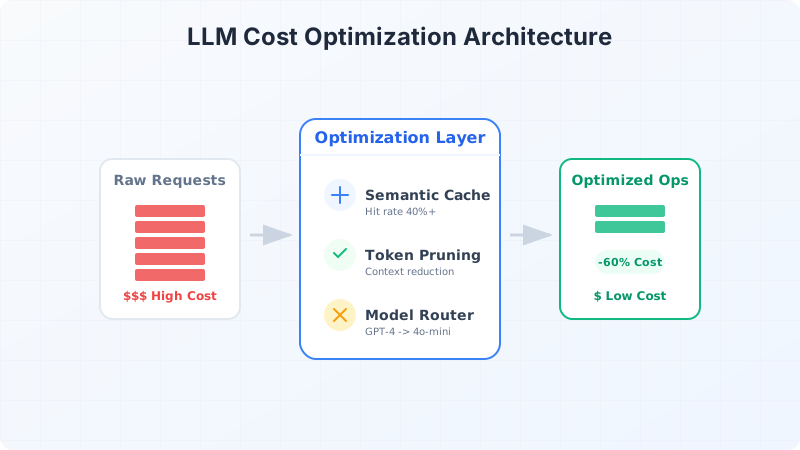
Strategy 1: Semantic Caching
> If you only remember one thing: The highest-impact optimization is often the simplest - don't call the LLM if you already know the answer.
Traditional caching uses exact string matching. But LLM queries have semantic equivalence - "What is the capital of France?" and "France's capital city?" should return the same cached response.
Semantic caching uses embeddings to find similar previous queries:
interface CacheEntry {
  queryEmbedding: number[];
  query: string;
  response: string;
  model: string;
  timestamp: Date;
  hitCount: number;
}

class SemanticCache {
  private vectorStore: VectorStore;
  private similarityThreshold = 0.95;

  async get(query: string): Promise<string | null> {
    const queryEmbedding = await embed(query);

    const results = await this.vectorStore.search({
      vector: queryEmbedding,
      topK: 1,
      filter: { timestamp: { $gt: this.getCutoffDate() } }
    });

    if (results.length > 0 && results[0].score >= this.similarityThreshold) {
      await this.incrementHitCount(results[0].id);
      return results[0].metadata.response;
    }

    return null;
  }

  async set(query: string, response: string, model: string): Promise<void> {
    const queryEmbedding = await embed(query);

    await this.vectorStore.upsert({
      id: generateId(),
      vector: queryEmbedding,
      metadata: {
        query,
        response,
        model,
        timestamp: new Date(),
        hitCount: 0
      }
    });
  }
}
Cache Effectiveness
The value of caching depends on query patterns:
High-value scenarios:
Low-value scenarios:
Measure your cache hit rate. Well-suited applications achieve 30-60% hit rates, translating directly to cost savings.
Cache Invalidation
Cached responses can become stale. Implement invalidation strategies:
interface CachePolicy {
  maxAge: number;           // Maximum age in seconds
  maxHits: number;          // Invalidate after N hits (for evolving answers)
  modelVersion: string;     // Invalidate when model changes
  contentHash?: string;     // Invalidate when source content changes
}

function shouldInvalidate(entry: CacheEntry, policy: CachePolicy): boolean {
  const age = Date.now() - entry.timestamp.getTime();

  return (
    age > policy.maxAge * 1000 ||
    entry.hitCount > policy.maxHits ||
    entry.modelVersion !== policy.modelVersion
  );
}
Strategy 2: Model Routing
Not every request needs your most powerful (expensive) model. Model routing selects the appropriate model based on task complexity. ("Why are we using GPT-4 to answer 'What are your business hours?'" is a question that should haunt you.)
> Pro tip: Default to your cheapest model, then escalate. Most teams do the opposite and wonder why costs explode.
Complexity Classification
Train a small classifier or use heuristics to assess query complexity:
type Complexity = 'simple' | 'moderate' | 'complex';

interface RoutingDecision {
  complexity: Complexity;
  model: string;
  reasoning: string;
}

async function routeRequest(query: string, context: string): Promise<RoutingDecision> {
  // Heuristic-based routing
  const wordCount = query.split(' ').length;
  const codeBlockMarker = String.fromCharCode(96).repeat(3); // backticks
  const hasCodeBlock = query.includes(codeBlockMarker);
  const requiresReasoning = /why|how|explain|analyze/i.test(query);
  const isSimpleQA = /what is|who is|when did|where is/i.test(query);

  if (isSimpleQA && wordCount < 20 && !hasCodeBlock) {
    return {
      complexity: 'simple',
      model: 'gpt-4o-mini',
      reasoning: 'Simple factual question'
    };
  }

  if (hasCodeBlock || (requiresReasoning && context.length > 5000)) {
    return {
      complexity: 'complex',
      model: 'gpt-4o',
      reasoning: 'Complex reasoning or code analysis required'
    };
  }

  return {
    complexity: 'moderate',
    model: 'gpt-4o-mini',
    reasoning: 'Standard complexity task'
  };
}
Fallback Chains
Start with cheaper models and escalate if quality is insufficient:
interface ModelTier {
  model: string;
  costPer1K: number;
  qualityThreshold: number;
}

const modelChain: ModelTier[] = [
  { model: 'gpt-4o-mini', costPer1K: 0.00015, qualityThreshold: 0.8 },
  { model: 'gpt-4o', costPer1K: 0.005, qualityThreshold: 0.9 },
  { model: 'gpt-4-turbo', costPer1K: 0.01, qualityThreshold: 1.0 },
];

async function generateWithFallback(
  prompt: string,
  qualityChecker: (response: string) => Promise<number>
): Promise<{ response: string; model: string; cost: number }> {

  for (const tier of modelChain) {
    const response = await callModel(tier.model, prompt);
    const quality = await qualityChecker(response);

    if (quality >= tier.qualityThreshold) {
      return {
        response,
        model: tier.model,
        cost: calculateCost(prompt, response, tier)
      };
    }
  }

  // Final tier always returns
  const finalTier = modelChain[modelChain.length - 1];
  const response = await callModel(finalTier.model, prompt);
  return {
    response,
    model: finalTier.model,
    cost: calculateCost(prompt, response, finalTier)
  };
}
Quality Assessment
The challenge is automated quality assessment. Options include:
Strategy 3: Prompt Optimization
Shorter prompts cost less. But naive truncation destroys quality. Smart prompt optimization maintains quality while reducing tokens.
Prompt Compression
Remove redundancy without losing meaning:
// Before: 847 tokens
const verbosePrompt = `
You are an extremely helpful AI assistant that specializes in
providing detailed and comprehensive answers to user questions.
Your goal is to help users by giving them accurate, relevant,
and useful information. Please make sure to be thorough in your
responses while also being clear and easy to understand.

The user has asked the following question, and you should provide
a helpful response that addresses their needs:
`;

// After: 43 tokens
const compressedPrompt = `
You are a helpful assistant. Answer clearly and accurately.

Question:
`;
Context Pruning
For RAG applications, not all retrieved context is equally relevant:
async function pruneContext(
  chunks: Chunk[],
  query: string,
  maxTokens: number
): Promise<Chunk[]> {
  // Score relevance of each chunk
  const scored = await Promise.all(chunks.map(async (chunk) => ({
    chunk,
    relevance: await scoreRelevance(chunk.content, query)
  })));

  // Sort by relevance
  scored.sort((a, b) => b.relevance - a.relevance);

  // Take chunks until token budget exhausted
  const selected: Chunk[] = [];
  let tokens = 0;

  for (const { chunk, relevance } of scored) {
    const chunkTokens = countTokens(chunk.content);
    if (tokens + chunkTokens <= maxTokens) {
      selected.push(chunk);
      tokens += chunkTokens;
    }
  }

  return selected;
}
Output Length Control
Specify desired output length to prevent verbose responses:
// Expensive: model rambles
const openEnded = 'Explain how React hooks work.';

// Cheaper: constrained output
const constrained = 'Explain React hooks in 2-3 sentences.';

// Even cheaper for structured output
const structured = `Explain React hooks. Format:
- Purpose: [one sentence]
- Key hooks: [comma-separated list]
- Example: [one line of code]`;
Strategy 4: Batching and Streaming
Request Batching
Combine multiple small requests into single larger requests:
interface BatchItem {
  id: string;
  prompt: string;
  resolve: (response: string) => void;
}

class RequestBatcher {
  private queue: BatchItem[] = [];
  private timeout: NodeJS.Timeout | null = null;
  private readonly maxBatchSize = 10;
  private readonly maxWaitMs = 100;

  async add(prompt: string): Promise<string> {
    return new Promise((resolve) => {
      this.queue.push({ id: generateId(), prompt, resolve });
      this.scheduleBatch();
    });
  }

  private scheduleBatch(): void {
    if (this.timeout) return;

    if (this.queue.length >= this.maxBatchSize) {
      this.processBatch();
    } else {
      this.timeout = setTimeout(() => this.processBatch(), this.maxWaitMs);
    }
  }

  private async processBatch(): Promise<void> {
    this.timeout = null;
    const batch = this.queue.splice(0, this.maxBatchSize);

    const combinedPrompt = batch
      .map((item, i) => `[Query ${i + 1}]\n${item.prompt}`)
      .join('\n\n---\n\n');

    const instructions = `Answer each query separately, prefixing each answer with [Answer N]:`;

    const response = await callModel('gpt-4o-mini', instructions + combinedPrompt);
    const answers = parseAnswers(response);

    batch.forEach((item, i) => item.resolve(answers[i]));
  }
}
Streaming for Perceived Performance
Streaming does not reduce costs, but it improves perceived performance, reducing user abandonment:
async function* streamResponse(prompt: string): AsyncGenerator<string> {
  const stream = await openai.chat.completions.create({
    model: 'gpt-4o-mini',
    messages: [{ role: 'user', content: prompt }],
    stream: true
  });

  for await (const chunk of stream) {
    const content = chunk.choices[0]?.delta?.content;
    if (content) yield content;
  }
}
Strategy 5: Self-Hosted Models
For high-volume applications, self-hosting open-source models can dramatically reduce per-query costs.
Cost Comparison
interface CostModel {
  name: string;
  monthlyCost: number;        // Fixed infrastructure cost
  perQueryCost: number;       // Variable cost per query
  queriesPerMonth: number;    // Breakeven point
}

const comparisons: CostModel[] = [
  {
    name: 'GPT-4o API',
    monthlyCost: 0,
    perQueryCost: 0.01,  // Average query cost
    queriesPerMonth: 0
  },
  {
    name: 'Self-hosted Llama-3-70B (A100 GPU)',
    monthlyCost: 3000,   // GPU instance cost
    perQueryCost: 0.001, // Electricity, maintenance
    queriesPerMonth: 333333  // Breakeven
  },
  {
    name: 'Self-hosted Llama-3-8B (RTX 4090)',
    monthlyCost: 500,
    perQueryCost: 0.0002,
    queriesPerMonth: 51000  // Breakeven
  }
];

function calculateMonthlyCost(model: CostModel, queries: number): number {
  return model.monthlyCost + (queries * model.perQueryCost);
}
When Self-Hosting Makes Sense
When API Makes Sense
Implementing Cost Controls
Protect against runaway costs with hard limits and monitoring.
Budget Controls
interface CostLimits {
  perRequest: number;
  perUser: number;
  perHour: number;
  perDay: number;
}

class CostController {
  private usage = new Map<string, number>();

  async checkAndTrack(
    userId: string,
    estimatedCost: number,
    limits: CostLimits
  ): Promise<{ allowed: boolean; reason?: string }> {

    if (estimatedCost > limits.perRequest) {
      return { allowed: false, reason: 'Request exceeds per-request limit' };
    }

    const userHourly = this.getUsage(userId, 'hour');
    if (userHourly + estimatedCost > limits.perUser) {
      return { allowed: false, reason: 'User hourly limit exceeded' };
    }

    const systemHourly = this.getUsage('system', 'hour');
    if (systemHourly + estimatedCost > limits.perHour) {
      return { allowed: false, reason: 'System hourly limit exceeded' };
    }

    return { allowed: true };
  }

  track(userId: string, actualCost: number): void {
    this.incrementUsage(userId, actualCost);
    this.incrementUsage('system', actualCost);
  }
}
Cost Monitoring Dashboard
Track these metrics:
Alerts
Set alerts for:
Real-World Results
Let me share results from applying these strategies to a production application:
Before Optimization
After Optimization
The optimizations took two weeks to implement and paid for themselves in the first month.
Best Practices Checklist
FAQ
Q: Which optimization should I implement first?
Semantic caching. It's the highest ROI with the lowest risk. You can often achieve 30-50% cost reduction in a week of work.
Q: How do I measure quality when routing to cheaper models?
Start with human evaluation on a sample. Then train a small classifier on those labels, or use a cheaper LLM to evaluate outputs. Track user feedback (thumbs up/down) as ground truth over time.
Q: What's a good cache hit rate to target?
Depends on your use case. FAQ-style apps can hit 60%+. Creative applications might only see 10-20%. If you're below 10%, caching may not be worth the complexity.
Q: When does self-hosting make sense?
Model the breakeven: (monthly infrastructure cost) / (API cost per query - self-hosted cost per query). If you're past breakeven with margin for growth, consider it. But factor in ops overhead - it's not just GPU costs.
Q: How do I prevent cost spikes from bugs or abuse?
Layer your defenses: per-request limits, per-user rate limits, hourly system limits, daily budget caps. Alert at 70% of each limit. Kill switch for emergencies.
---
LLM costs aren't a fixed constraint - they're an engineering problem. With systematic optimization, you can build AI features that delight users and satisfy finance.

💬Discussion
No comments yet
Be the first to share your thoughts!