The 3 AM Wake-Up Call
It's 3 AM, and your phone won't stop buzzing. The AI agent your team shipped last week - the one that was supposed to handle tier-1 support tickets automatically - has been running in circles for six hours. It's burned through $2,400 in API calls trying to resolve a single password reset. The customer gave up at midnight. Your VP of Engineering is asking why the "revolutionary AI" is now a line item that needs explaining.
"It worked perfectly in staging," you tell yourself, scrolling through logs that show the same tool call repeated 847 times.
Sound familiar? You're not alone. The gap between a demo that impresses stakeholders and a system that handles real users at 3 AM is where most AI agent projects go to die.
Here's what most tutorials skip: production agents fail in predictable ways, and there are battle-tested patterns to prevent each failure mode. This guide covers those patterns - the ones we learned the hard way so you don't have to.
What Makes an Agent Different
An AI agent isn't just a model that generates text. It's a system that reasons about goals, plans action sequences, executes those actions through tools, observes results, and adapts based on what it learns. Where a chatbot tells you how to book a flight, an agent actually books it.
This unlocks new application categories: autonomous customer service that resolves issues end-to-end, coding assistants that implement features across multiple files, research agents that synthesize information from dozens of sources, and ops agents that monitor systems and respond to incidents.
But the demos hide the hard parts. Let's fix that.
Why Agents Fail in Production
Before diving into patterns that work, you need to understand why naive implementations fail. This shapes every architectural decision.
> Watch out: These aren't theoretical risks. Every production agent team encounters most of these within their first month.
Unbounded Loops: Without proper constraints, agents enter infinite loops - repeatedly trying the same failing action or endlessly "thinking" without progress. In demos, you stop the agent manually. In production, this burns money and frustrates users.
Tool Misuse: Agents call tools with malformed arguments, wrong sequences, or in contexts where the tool can't help. A database query tool called with SQL injection-like input. A file system tool pointed at paths that don't exist. An email tool triggered by ambiguous instructions.
Context Window Overflow: As agents work, they accumulate context - observations, tool outputs, intermediate reasoning. Eventually this exceeds the model's context window, causing failures or degraded performance as important early context gets truncated.
Inconsistent Reasoning: The same prompt produces different reasoning paths on different runs. Sometimes the agent solves the problem elegantly; sometimes it goes completely off track. This non-determinism makes debugging a nightmare. ("I swear it worked yesterday...")
Cascading Failures: When one tool fails, agents often don't recover gracefully. They retry indefinitely, abandon the task prematurely, or hallucinate that the tool succeeded when it didn't.
This isn't pessimism - it's the foundation for building systems that actually handle reality.
The ReAct Pattern: Foundation of Modern Agents
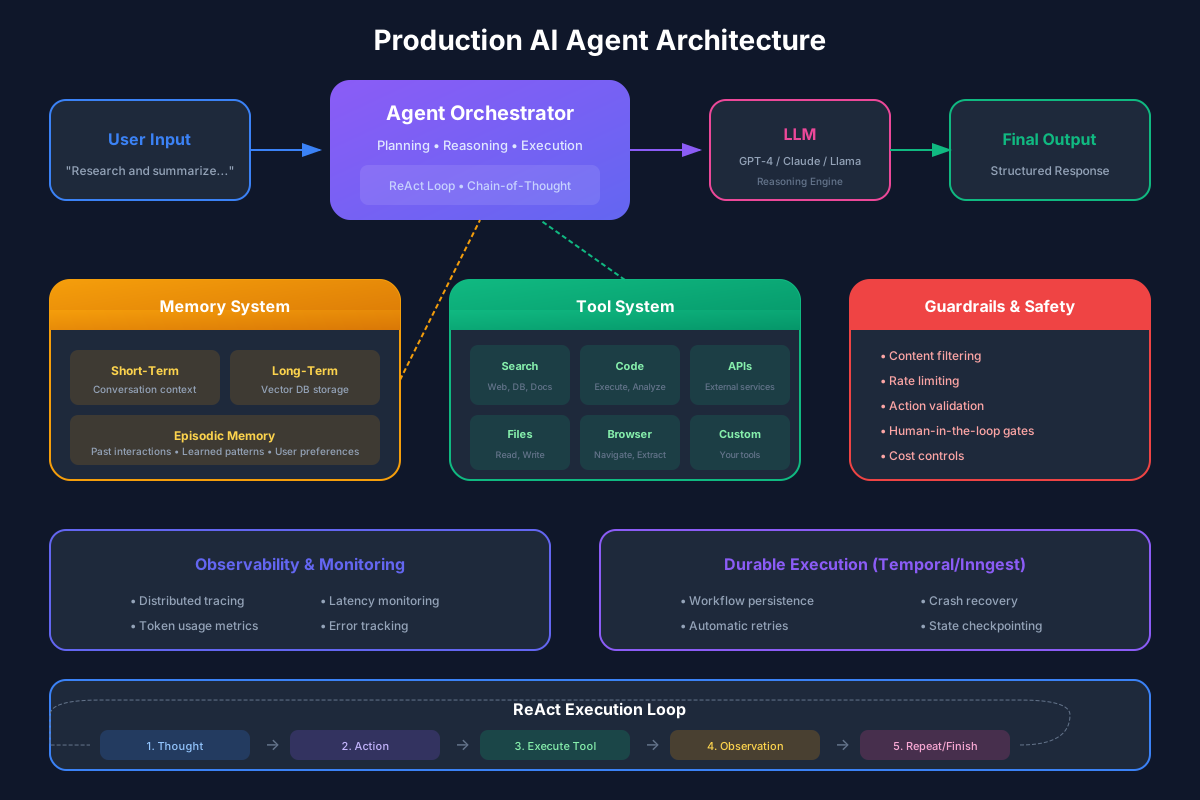
The ReAct (Reasoning and Acting) pattern has become the foundation for production agent architectures. It interleaves reasoning with acting in a structured loop:
This structure provides several critical benefits. The explicit thought step creates an audit trail - you can see why the agent made each decision. The separation of action and observation enables retries and error handling. The loop structure allows for intervention and correction.
Here is how this looks in practice:
interface AgentState {
  goal: string;
  thoughts: string[];
  actions: Action[];
  observations: string[];
  status: 'running' | 'completed' | 'failed';
}

interface Action {
  tool: string;
  arguments: Record<string, unknown>;
  timestamp: Date;
}

async function runAgentLoop(
  initialGoal: string,
  tools: Tool[],
  maxIterations: number = 10
): Promise<AgentState> {
  const state: AgentState = {
    goal: initialGoal,
    thoughts: [],
    actions: [],
    observations: [],
    status: 'running'
  };

  for (let i = 0; i < maxIterations && state.status === 'running'; i++) {
    // Generate thought about current state
    const thought = await generateThought(state, tools);
    state.thoughts.push(thought);

    // Check if agent believes task is complete
    if (thought.includes('TASK_COMPLETE')) {
      state.status = 'completed';
      break;
    }

    // Select and execute action
    const action = await selectAction(thought, tools);
    state.actions.push(action);

    // Execute tool and capture observation
    try {
      const observation = await executeTool(action, tools);
      state.observations.push(observation);
    } catch (error) {
      state.observations.push(`Error: ${error.message}`);
    }
  }

  if (state.status === 'running') {
    state.status = 'failed'; // Max iterations reached
  }

  return state;
}
Tool Design: The Make-or-Break Factor
Tools are how agents interact with the world. Poor tool design is the single most common cause of agent failures. Great tool design makes agents dramatically more reliable.
> If you only remember one thing: Spend more time on tool design than prompt engineering. Great tools make mediocre prompts work; poor tools defeat great prompts.
Principle 1: Tools Should Be Atomic and Focused
Each tool should do one thing well. A tool that "manages files" (create, read, update, delete, list, search) is too broad - the agent must understand too many options and edge cases. Instead, create focused tools: readFile, writeFile, listDirectory, searchFiles.
Principle 2: Descriptions Are Prompts
The tool description isn't documentation for humans - it's a prompt for the model. Write descriptions that help the model understand when and how to use the tool:
// Bad: Technical and vague
const badTool = {
  name: 'db_query',
  description: 'Executes SQL queries against the database'
};

// Good: Clear purpose and constraints
const goodTool = {
  name: 'search_customers',
  description: `Search for customers by name or email.
    Use this when you need to find customer information.
    Returns up to 10 matching customers with their id, name, email, and signup date.
    Example: search_customers({ query: "john@example.com" })`
};
Principle 3: Validate Inputs Aggressively
Assume the agent will call your tool with incorrect arguments. Validate everything and return helpful error messages:
async function searchCustomers(args: unknown): Promise<string> {
  // Validate input structure
  if (!args || typeof args !== 'object') {
    return 'Error: Expected an object with a "query" field';
  }

  const { query } = args as { query?: unknown };

  if (!query || typeof query !== 'string') {
    return 'Error: "query" must be a non-empty string';
  }

  if (query.length < 2) {
    return 'Error: Search query must be at least 2 characters';
  }

  if (query.length > 100) {
    return 'Error: Search query must be less than 100 characters';
  }

  // Sanitize to prevent injection
  const sanitizedQuery = query.replace(/[%_]/g, '');

  try {
    const customers = await db.customers.search(sanitizedQuery);

    if (customers.length === 0) {
      return 'No customers found matching your search.';
    }

    return JSON.stringify(customers.slice(0, 10), null, 2);
  } catch (error) {
    return `Database error: ${error.message}. Try a different search term.`;
  }
}
Principle 4: Return Structured, Actionable Output
Tool outputs should help the agent understand what happened and what to do next:
// Bad: Raw data dump
return JSON.stringify(results);

// Good: Structured with context
return `Found ${results.length} customers matching "${query}":
${results.map(c => `- ${c.name} (${c.email}) - Customer since ${c.signupDate}`).join('\n')}

${results.length === 10 ? 'Note: Results limited to 10. Refine your search for more specific results.' : ''}`;
Error Handling and Guardrails
Production agents need multiple layers of protection against failures. Think of it like defensive driving - assume other drivers (your agent's reasoning) will make mistakes.
> Pro tip: Build guardrails before you need them. Adding them after a production incident is stressful and error-prone.
Retry Logic with Backoff
Transient failures should be retried, but with intelligence:
async function executeToolWithRetry(
  action: Action,
  tools: Tool[],
  maxRetries: number = 3
): Promise<string> {
  let lastError: Error | null = null;

  for (let attempt = 0; attempt < maxRetries; attempt++) {
    try {
      return await executeTool(action, tools);
    } catch (error) {
      lastError = error;

      // Don't retry on validation errors
      if (error.message.includes('Invalid argument')) {
        throw error;
      }

      // Exponential backoff
      const delay = Math.pow(2, attempt) * 100;
      await sleep(delay);
    }
  }

  throw lastError;
}
Budget Controls
Set hard limits on agent resources:
interface AgentBudget {
  maxIterations: number;
  maxTokens: number;
  maxToolCalls: number;
  maxDurationMs: number;
}

class BudgetExceededError extends Error {
  constructor(public budgetType: keyof AgentBudget) {
    super(`Agent exceeded ${budgetType} budget`);
  }
}

function checkBudget(state: AgentState, budget: AgentBudget): void {
  if (state.iterations >= budget.maxIterations) {
    throw new BudgetExceededError('maxIterations');
  }
  if (state.totalTokens >= budget.maxTokens) {
    throw new BudgetExceededError('maxTokens');
  }
  if (state.actions.length >= budget.maxToolCalls) {
    throw new BudgetExceededError('maxToolCalls');
  }
  if (Date.now() - state.startTime >= budget.maxDurationMs) {
    throw new BudgetExceededError('maxDurationMs');
  }
}
Fallback Behaviors
When things go wrong, have graceful fallbacks:
async function runAgentWithFallback(
  goal: string,
  tools: Tool[]
): Promise<AgentResult> {
  try {
    return await runAgentLoop(goal, tools);
  } catch (error) {
    if (error instanceof BudgetExceededError) {
      // Summarize what was accomplished
      return {
        status: 'partial',
        message: 'I was not able to complete the full task, but here is what I found so far...',
        partialResults: summarizeProgress(state)
      };
    }

    // For unexpected errors, provide helpful response
    return {
      status: 'failed',
      message: 'I encountered an unexpected issue. Please try rephrasing your request or breaking it into smaller steps.',
      error: error.message
    };
  }
}
Monitoring and Observability
You can't improve what you can't measure. Production agents require comprehensive observability. ("Why did it do that?" is a question you'll ask a hundred times - make sure you can answer it.)
Structured Logging
Log every significant event with context:
interface AgentLogEvent {
  traceId: string;
  timestamp: Date;
  eventType: 'thought' | 'action' | 'observation' | 'error' | 'complete';
  iteration: number;
  content: string;
  metadata: Record<string, unknown>;
}

function logAgentEvent(event: AgentLogEvent): void {
  console.log(JSON.stringify({
    ...event,
    timestamp: event.timestamp.toISOString(),
    service: 'ai-agent',
    version: process.env.APP_VERSION
  }));
}
Metrics to Track
Essential metrics for agent health:
Distributed Tracing
For complex agents, trace the full execution:
import { trace, context, SpanStatusCode } from '@opentelemetry/api';

const tracer = trace.getTracer('ai-agent');

async function runAgentWithTracing(goal: string): Promise<AgentResult> {
  return tracer.startActiveSpan('agent.run', async (span) => {
    span.setAttribute('agent.goal', goal);

    try {
      const result = await runAgentLoop(goal);
      span.setAttribute('agent.iterations', result.iterations);
      span.setAttribute('agent.status', result.status);
      span.setStatus({ code: SpanStatusCode.OK });
      return result;
    } catch (error) {
      span.setStatus({ code: SpanStatusCode.ERROR, message: error.message });
      span.recordException(error);
      throw error;
    } finally {
      span.end();
    }
  });
}
Advanced Patterns
As your agent matures, consider these advanced patterns:
Planning and Decomposition
For complex tasks, have the agent create a plan before executing:
async function runPlanningAgent(goal: string): Promise<AgentResult> {
  // First, create a plan
  const plan = await generatePlan(goal);

  // Execute each step
  for (const step of plan.steps) {
    const result = await runAgentLoop(step.description, step.tools);

    if (result.status === 'failed') {
      // Replan based on failure
      const newPlan = await replan(goal, plan, step, result);
      // Continue with new plan...
    }
  }
}
Human-in-the-Loop
For high-stakes actions, require human approval:
interface ApprovalRequired {
  action: Action;
  reason: string;
  riskLevel: 'low' | 'medium' | 'high';
}

async function executeWithApproval(
  action: Action,
  approvalCallback: (req: ApprovalRequired) => Promise<boolean>
): Promise<string> {
  const riskLevel = assessRisk(action);

  if (riskLevel !== 'low') {
    const approved = await approvalCallback({
      action,
      reason: `This action will ${describeAction(action)}`,
      riskLevel
    });

    if (!approved) {
      return 'Action cancelled by user.';
    }
  }

  return executeTool(action);
}
Real-World Case Study
Let me share how these patterns came together for a production customer service agent.
The Challenge: Automate resolution of common support tickets - password resets, subscription changes, refund requests - while escalating complex issues to humans.
The Solution Architecture:
Key Design Decisions:
Results After 3 Months:
Best Practices Checklist
After building dozens of production agents, these principles consistently matter most:
FAQ
Q: How do I choose between ReAct and other agent patterns?
ReAct is the right starting point for 90% of use cases. Consider alternatives (like plan-and-execute) only when you have specific evidence that ReAct isn't meeting your needs.
Q: What's a reasonable iteration limit for production agents?
Start with 5-10 iterations. If your agent regularly needs more, your tools are probably too granular or your task decomposition needs work.
Q: How do I handle agents that get stuck in loops?
Implement loop detection by hashing (action, arguments) pairs and tracking repetition. After 2-3 identical calls, force the agent to try a different approach or escalate.
Q: Should I use LangChain or build custom?
LangChain accelerates prototyping but can hide complexity you need to understand for production. Build custom for anything mission-critical; use frameworks for internal tools and experiments.
Q: How much should I budget for agent API costs?
Plan for 3-5x your expected usage initially. Agents are unpredictable, and it's better to have headroom than to hit limits during a demo.
---
The path from demo to production is long, but these patterns will get you there. The agents that succeed in production aren't the cleverest - they're the most robust.
Recommended Reading

Building LLM Powered Applications
by Valentina Alto
Create intelligent apps and agents with large language models
As an Amazon Associate, we earn from qualifying purchases.
Designing Machine Learning Systems
by Chip Huyen
ML systems design for production
As an Amazon Associate, we earn from qualifying purchases.
💬Discussion
No comments yet
Be the first to share your thoughts!