The Documentation Problem
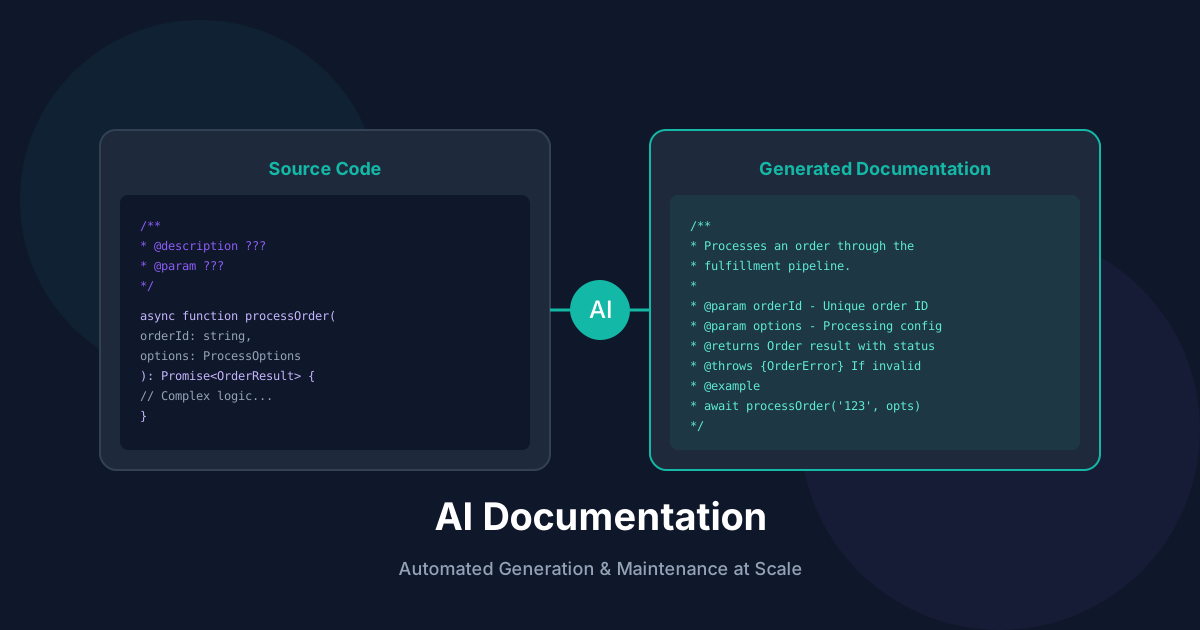
Documentation is essential but often neglected. AI solves this by:
JSDoc Generation
Automated JSDoc Pipeline
TypeScript
import { Project, SourceFile } from 'ts-morph';

async function generateJSDocs(filePath: string): Promise<void> {
  const project = new Project();
  const sourceFile = project.addSourceFileAtPath(filePath);

  // Find functions without JSDoc
  const undocumented = sourceFile.getFunctions().filter(
    fn => !fn.getJsDocs().length
  );

  for (const fn of undocumented) {
    const signature = fn.getSignature();
    const params = fn.getParameters();
    const returnType = fn.getReturnType();

    const doc = await generateDocForFunction({
      name: fn.getName(),
      params: params.map(p => ({
        name: p.getName(),
        type: p.getType().getText(),
      })),
      returnType: returnType.getText(),
      body: fn.getBodyText(),
    });

    fn.addJsDoc(doc);
  }

  await sourceFile.save();
}
AI-Powered Doc Generation
TypeScript
async function generateDocForFunction(fn: FunctionInfo): Promise<string> {
  const prompt = `Generate JSDoc for this TypeScript function.

Function: ${fn.name}
Parameters: ${JSON.stringify(fn.params)}
Return Type: ${fn.returnType}
Implementation:
${fn.body}

Requirements:
1. Describe what the function does (not how)
2. Document each parameter with @param
3. Document return value with @returns
4. Add @throws if it can throw
5. Include a usage @example
6. Keep it concise but complete`;

  const response = await openai.chat.completions.create({
    model: 'gpt-4-turbo',
    messages: [{ role: 'user', content: prompt }],
    temperature: 0.3,
  });

  return response.choices[0].message.content;
}
API Documentation
OpenAPI from Code
TypeScript
async function generateOpenAPISpec(routesDir: string): Promise<OpenAPISpec> {
  const routes = await scanAPIRoutes(routesDir);

  const paths: Record<string, PathItem> = {};

  for (const route of routes) {
    const analysis = await analyzeRoute(route);

    paths[route.path] = {
      [route.method.toLowerCase()]: {
        summary: analysis.summary,
        description: analysis.description,
        parameters: analysis.parameters,
        requestBody: analysis.requestBody,
        responses: analysis.responses,
        tags: analysis.tags,
      },
    };
  }

  return {
    openapi: '3.0.0',
    info: { title: 'API Documentation', version: '1.0.0' },
    paths,
  };
}

async function analyzeRoute(route: Route): Promise<RouteAnalysis> {
  const prompt = `Analyze this API route and generate OpenAPI documentation.

Route: ${route.method} ${route.path}
Handler:
${route.handlerCode}

Provide:
1. Summary (one line)
2. Description (detailed)
3. Request parameters/body schema
4. Response schemas with status codes
5. Suggested tags`;

  const response = await openai.chat.completions.create({
    model: 'gpt-4-turbo',
    messages: [{ role: 'user', content: prompt }],
    response_format: { type: 'json_object' },
  });

  return JSON.parse(response.choices[0].message.content);
}
README Generation
TypeScript
async function generateREADME(projectPath: string): Promise<string> {
  // Gather project info
  const packageJson = await readJSON(`${projectPath}/package.json`);
  const structure = await getDirectoryStructure(projectPath);
  const mainFiles = await readMainFiles(projectPath);

  const prompt = `Generate a comprehensive README.md for this project.

Package.json:
${JSON.stringify(packageJson, null, 2)}

Project Structure:
${structure}

Key Files:
${mainFiles}

Include:
1. Project title and badges
2. Description (what it does, why it exists)
3. Installation instructions
4. Quick start / Usage examples
5. Configuration options
6. API reference (if applicable)
7. Contributing guidelines
8. License

Use proper Markdown formatting.`;

  const response = await openai.chat.completions.create({
    model: 'gpt-4-turbo',
    messages: [{ role: 'user', content: prompt }],
  });

  return response.choices[0].message.content;
}
Documentation Sync
Git Hook Integration
YAML
# .github/workflows/docs-sync.yml
name: Documentation Sync
on:
  push:
    paths:
      - 'src/**/*.ts'
      - '!src/**/*.test.ts'

jobs:
  sync-docs:
    runs-on: ubuntu-latest
    steps:
      - uses: actions/checkout@v4

      - name: Detect changed files
        id: changes
        uses: dorny/paths-filter@v2
        with:
          list-files: json
          filters: |
            src:
              - 'src/**/*.ts'

      - name: Update documentation
        if: steps.changes.outputs.src == 'true'
        run: |
          npx ai-doc-gen update \
            --files '${{ steps.changes.outputs.src_files }}' \
            --output docs/

      - name: Commit updates
        uses: stefanzweifel/git-auto-commit-action@v5
        with:
          commit_message: 'docs: auto-update documentation'
          file_pattern: 'docs/**'
Stale Documentation Detection
TypeScript
async function detectStaleDocs(codeFile: string, docFile: string): Promise<boolean> {
  const code = await readFile(codeFile);
  const doc = await readFile(docFile);

  const analysis = await openai.chat.completions.create({
    model: 'gpt-4-turbo',
    messages: [{
      role: 'user',
      content: `Compare this code with its documentation.

Code:
${code}

Documentation:
${doc}

Is the documentation accurate and up-to-date?
Identify any discrepancies or missing information.

Return JSON: { isStale: boolean, issues: string[] }`
    }],
    response_format: { type: 'json_object' },
  });

  const result = JSON.parse(analysis.choices[0].message.content);
  return result.isStale;
}
Architecture Documentation
TypeScript
async function generateArchitectureDocs(projectPath: string): Promise<string> {
  const codeStructure = await analyzeCodeStructure(projectPath);
  const dependencies = await analyzeDependencies(projectPath);
  const dataFlow = await analyzeDataFlow(projectPath);

  const prompt = `Generate architecture documentation.

Code Structure:
${JSON.stringify(codeStructure)}

Dependencies:
${JSON.stringify(dependencies)}

Data Flow:
${JSON.stringify(dataFlow)}

Create:
1. System Overview
2. Component Diagram (Mermaid)
3. Data Flow Diagram
4. Key Design Decisions
5. Integration Points`;

  return await generateWithAI(prompt);
}
Best Practices
Recommended Reading
💬Discussion
🗨️
No comments yet
Be the first to share your thoughts!