Introduction: The AI-Augmented Developer
We are witnessing the most significant transformation in software development since the advent of high-level programming languages. AI coding assistants - GitHub Copilot, Claude, ChatGPT, Cursor, Windsurf, and others - are not replacing developers; they are amplifying them.
This playbook is your comprehensive guide to becoming an AI-augmented developer. Whether you're skeptical, curious, or already using AI tools, this guide will help you maximize your effectiveness while avoiding common pitfalls.
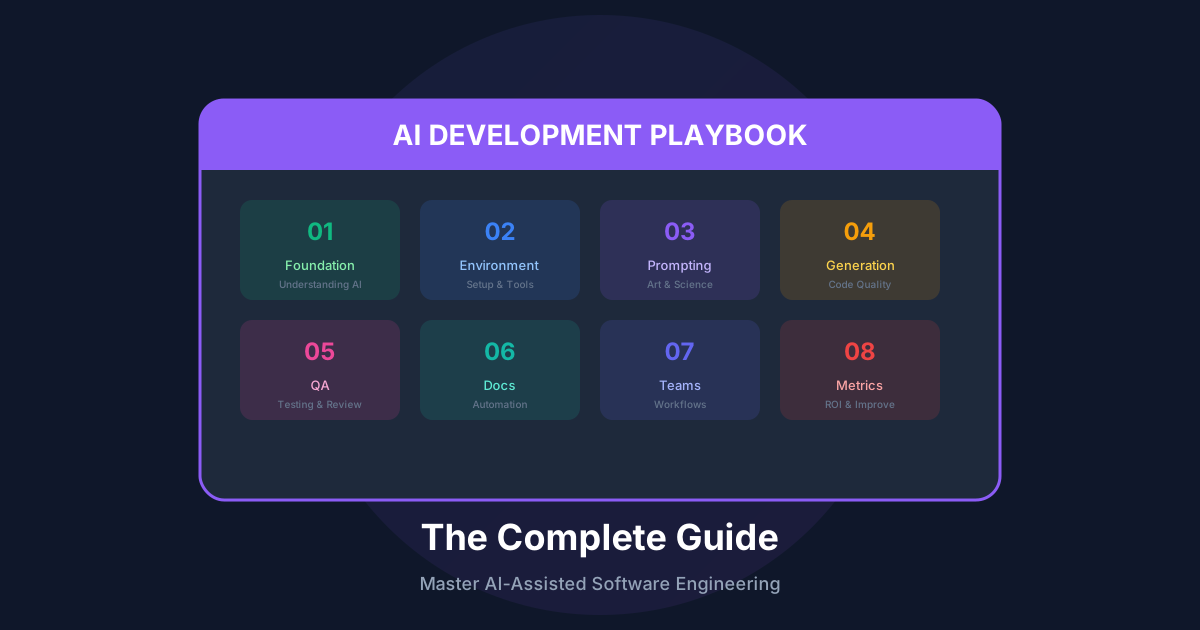
What This Playbook Covers
---
Part 1: Understanding AI Coding Assistants
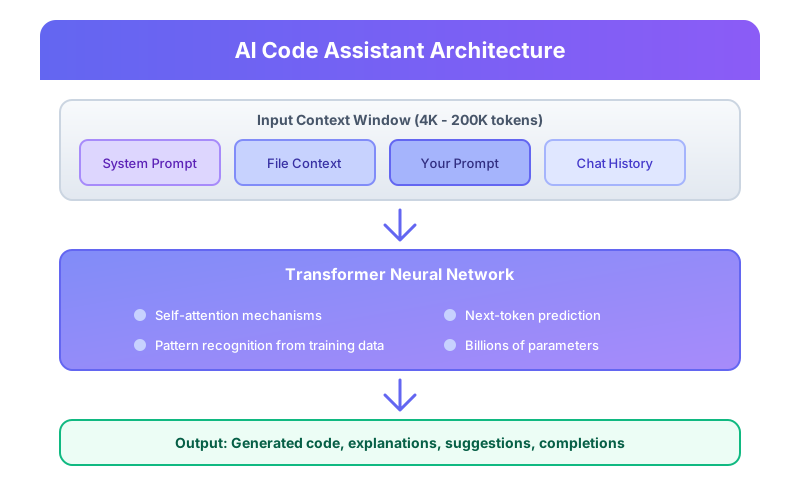
How AI Code Models Work
Modern AI coding assistants are built on Large Language Models (LLMs) trained on billions of lines of code. Understanding their architecture helps you use them effectively:
AI Capabilities: What They Excel At
Pattern Recognition & Completion
Code Transformation
Knowledge Synthesis
AI Limitations: Critical Understanding
No True Understanding
AI doesn't "understand" your code - it recognizes patterns. It cannot:
Hallucination Risks
AI can confidently generate:
Context Limitations
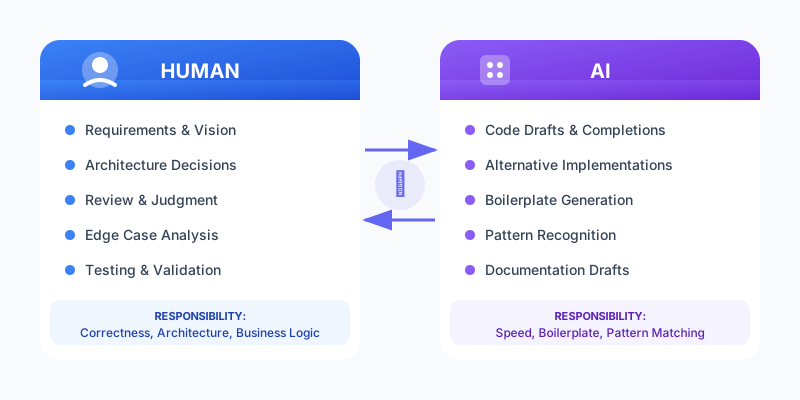
The Human-AI Partnership Model
---
Part 2: Setting Up Your AI Development Environment
Choosing Your AI Tools Stack
IDE Configuration for Maximum Effectiveness
VS Code Settings for AI Development
{
  "editor.inlineSuggest.enabled": true,
  "editor.inlineSuggest.showToolbar": "always",
  "github.copilot.enable": {
    "*": true,
    "markdown": true,
    "plaintext": false,
    "yaml": true
  },
  "github.copilot.advanced": {
    "length": 500,
    "temperature": "",
    "top_p": "",
    "stops": {
      "*": ["\n\n\n"]
    }
  },
  "editor.suggest.preview": true,
  "editor.acceptSuggestionOnCommitCharacter": false
}
The AGENTS.md Configuration File
Create a project-level AI configuration file that any AI assistant can read:
# AGENTS.md - AI Assistant Configuration

## Project Overview
This is a Next.js 15 e-commerce platform with TypeScript strict mode.
- **Stack**: React 18, Next.js 15, TypeScript 5.3, TailwindCSS, Prisma, PostgreSQL
- **Architecture**: App Router, Server Components, Server Actions
- **Testing**: Vitest, Playwright, React Testing Library

## Critical Rules (NEVER VIOLATE)
1. NEVER use `any` type - use `unknown` and narrow
2. NEVER commit secrets or API keys
3. NEVER disable TypeScript strict checks
4. NEVER skip error handling
5. ALWAYS use parameterized queries (SQL injection prevention)

## Code Style
- Use functional components with hooks
- Prefer named exports over default exports
- Use early returns to reduce nesting
- Maximum function length: 50 lines
- Maximum file length: 300 lines

## File Organization
\`\`\`
src/
├── app/           # Next.js App Router pages
├── components/    # React components
│   ├── ui/        # Reusable UI primitives
│   └── features/  # Feature-specific components
├── lib/           # Utilities and helpers
├── hooks/         # Custom React hooks
├── types/         # TypeScript type definitions
└── services/      # External API integrations
\`\`\`

## Naming Conventions
- Components: PascalCase (UserProfile.tsx)
- Hooks: camelCase with 'use' prefix (useAuth.ts)
- Utilities: camelCase (formatDate.ts)
- Types: PascalCase with descriptive suffix (UserProfileProps)
- Constants: SCREAMING_SNAKE_CASE

## Testing Requirements
- Unit tests for all utility functions
- Integration tests for API routes
- E2E tests for critical user flows
- Minimum 80% coverage for new code

## Common Patterns

### API Route Pattern
\`\`\`typescript
export async function GET(request: Request) {
  try {
    const data = await fetchData();
    return Response.json({ data });
  } catch (error) {
    console.error('[API] Error:', error);
    return Response.json(
      { error: 'Internal server error' },
      { status: 500 }
    );
  }
}
\`\`\`

### Component Pattern
\`\`\`typescript
interface Props {
  title: string;
  onAction: () => void;
}

export function MyComponent({ title, onAction }: Props) {
  // Implementation
}
\`\`\`
---
Part 3: The Art of Prompt Engineering
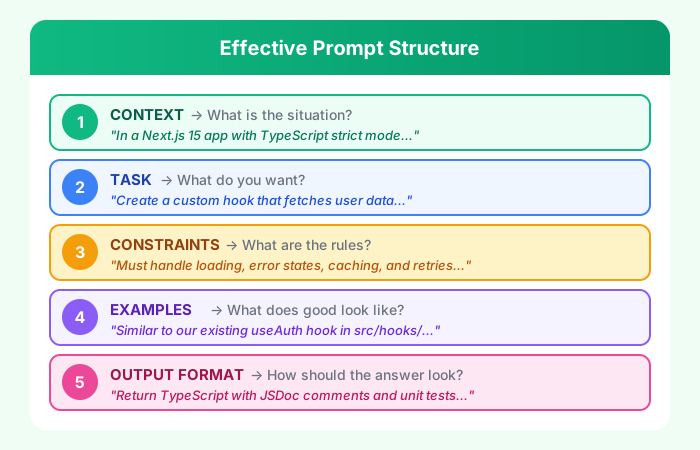
The Anatomy of an Effective Prompt
Prompt Patterns That Work
Pattern 1: The Reference Pattern
Provide existing code as a template:
Here's our existing API route pattern:

\`\`\`typescript
// src/app/api/users/route.ts
export async function GET(request: Request) {
  const session = await getServerSession();
  if (!session) {
    return Response.json({ error: 'Unauthorized' }, { status: 401 });
  }

  const users = await prisma.user.findMany();
  return Response.json({ data: users });
}
\`\`\`

Create a similar route for /api/products that:
- Requires authentication
- Supports pagination (?page=1&limit=20)
- Filters by category (?category=electronics)
- Returns total count for pagination
Pattern 2: The Constraint Pattern
Be explicit about boundaries:
Implement a rate limiter with these constraints:
- No external dependencies (use only Node.js built-ins)
- Must be thread-safe for concurrent requests
- Memory efficient (max 10MB for 100K tracked IPs)
- Configurable: requests per window, window size
- Must include TypeScript types
- Include unit tests with Vitest
Pattern 3: The Critique Pattern
Ask AI to review and improve:
Review this code for:
1. Security vulnerabilities
2. Performance issues
3. Error handling gaps
4. TypeScript strict mode compliance
5. Edge cases not handled

Then provide an improved version with explanations.

\`\`\`typescript
async function processPayment(userId: string, amount: number) {
  const user = await db.user.findUnique({ where: { id: userId }});
  await stripe.charges.create({
    amount: amount * 100,
    currency: 'usd',
    customer: user.stripeId
  });
  await db.transaction.create({
    data: { userId, amount, status: 'completed' }
  });
}
\`\`\`
Pattern 4: The Persona Pattern
Assign expertise:
Act as a senior security engineer with 15 years of experience
in application security. Review this authentication flow and
identify vulnerabilities according to OWASP Top 10 2024.

For each issue found:
- Severity (Critical/High/Medium/Low)
- CWE ID
- Exploitation scenario
- Remediation with code example
Pattern 5: The Scaffolding Pattern
Build incrementally:
Let's build a shopping cart system step by step.

Step 1: Define the TypeScript interfaces for:
- CartItem
- Cart
- CartAction (add, remove, update quantity, clear)

Don't implement yet, just the types.
Then follow up:
Step 2: Now implement the cart reducer function using those types.
Use immutable updates and handle all CartAction types.
Prompt Anti-Patterns to Avoid
❌ The Vague Request
Bad: "Make this code better"
Good: "Refactor this function to reduce cyclomatic complexity,
      add error handling for network failures, and improve
      TypeScript types to eliminate any usage"
❌ The Context Dump
Bad: *pastes 500 lines of code* "Fix the bug"
Good: "In the checkout flow (src/lib/checkout.ts:45-67),
      the calculateTotal function returns NaN when the
      cart contains items with undefined prices. Fix this
      to default to 0 for missing prices."
❌ The Assumption Trap
Bad: "Use the standard approach"
Good: "Use React Query v5 with the following configuration..."
❌ The Blind Trust
Bad: Copy-paste without review
Good: "Let me verify this handles the edge case where..."
Advanced: Chain-of-Thought Prompting
For complex problems, guide the AI's reasoning:
I need to optimize a database query that's timing out.

First, analyze the query and explain:
1. What the query is trying to accomplish
2. Why it might be slow (examine each JOIN, WHERE clause)
3. What indexes would help

Then, suggest optimizations:
1. Query restructuring
2. Index recommendations
3. Caching strategies

Finally, provide the optimized query with comments explaining each change.

Current query:
\`\`\`sql
SELECT u.*, COUNT(o.id) as order_count, SUM(o.total) as lifetime_value
FROM users u
LEFT JOIN orders o ON u.id = o.user_id
WHERE u.created_at > '2024-01-01'
  AND o.status = 'completed'
GROUP BY u.id
ORDER BY lifetime_value DESC
LIMIT 100;
\`\`\`
---
Part 4: Code Generation Mastery
Generating Production-Quality Code
The Quality Checklist Prompt
Generate [component/function/module] with production quality:

Functional Requirements:
- [Specific functionality]

Non-Functional Requirements:
- [ ] TypeScript strict mode compliant
- [ ] Comprehensive error handling
- [ ] Input validation
- [ ] Proper logging
- [ ] Performance optimized
- [ ] Accessible (if UI)
- [ ] Responsive (if UI)

Include:
- [ ] JSDoc documentation
- [ ] Unit tests (Vitest)
- [ ] Usage examples
Multi-File Generation
For features spanning multiple files:
Create a complete user authentication feature with:

Files needed:
1. src/app/api/auth/[...nextauth]/route.ts - NextAuth config
2. src/lib/auth.ts - Auth utilities
3. src/hooks/useAuth.ts - Client-side auth hook
4. src/components/AuthProvider.tsx - Context provider
5. src/components/LoginForm.tsx - Login UI
6. src/middleware.ts - Route protection

For each file:
- Follow our existing patterns (see AGENTS.md)
- Include proper TypeScript types
- Add error handling
- Include relevant tests

Start with the auth utilities (src/lib/auth.ts), then I'll
ask for each subsequent file.
Test-Driven Generation
I want to implement a password validation function.

First, generate comprehensive test cases covering:
- Minimum length (8 characters)
- Maximum length (128 characters)
- Requires uppercase
- Requires lowercase
- Requires number
- Requires special character
- No common passwords
- Edge cases (empty, whitespace, unicode)

Then implement the function to pass all tests.
Code Generation Best Practices
// 1. Always specify the exact signature you want
interface GeneratedFunction {
  name: string;
  params: { name: string; type: string; description: string }[];
  returnType: string;
  throws: string[];
}

// 2. Provide type context upfront
/*
Given these types:
- User { id: string; email: string; role: 'admin' | 'user' }
- Permission { resource: string; action: 'read' | 'write' | 'delete' }

Generate a function that checks if a user has permission...
*/

// 3. Request incremental delivery
/*
Step 1: Generate the function signature and types
Step 2: Implement the core logic
Step 3: Add error handling
Step 4: Add logging
Step 5: Generate tests
*/
---
Part 5: AI-Powered Quality Assurance
Code Review with AI
Structured Review Prompt
Review this pull request for merge readiness.

## Review Criteria

### 1. Correctness
- Does the code do what it claims?
- Are there logical errors?
- Are edge cases handled?

### 2. Security
- SQL injection vulnerabilities?
- XSS vulnerabilities?
- Authentication/authorization issues?
- Sensitive data exposure?

### 3. Performance
- N+1 queries?
- Memory leaks?
- Unnecessary re-renders?
- Missing indexes?

### 4. Maintainability
- Clear naming?
- Appropriate abstractions?
- Code duplication?
- Test coverage?

### 5. Standards Compliance
- TypeScript strict mode?
- Project conventions?
- API consistency?

## Output Format
For each issue:
- File and line number
- Severity (Critical/High/Medium/Low)
- Category
- Problem description
- Suggested fix with code

Code to review:
[paste diff or files]
AI-Powered Test Generation
Generate comprehensive tests for this function:

\`\`\`typescript
export async function transferFunds(
  fromAccount: string,
  toAccount: string,
  amount: number,
  currency: Currency
): Promise<TransferResult> {
  // Implementation
}
\`\`\`

Test categories to cover:
1. **Happy path**: Successful transfers
2. **Validation**: Invalid inputs (negative amounts, same account, invalid currency)
3. **Edge cases**: Zero amount, maximum amount, floating point precision
4. **Error conditions**: Insufficient funds, account not found, network timeout
5. **Concurrency**: Simultaneous transfers from same account
6. **Security**: SQL injection in account IDs, unauthorized access

Use Vitest with descriptive test names.
Include setup/teardown for database state.
Mock external services appropriately.
Security Scanning
Perform a security audit on this authentication module.

Reference frameworks:
- OWASP Top 10 2024
- CWE/SANS Top 25
- NIST guidelines

Check for:
1. **Injection flaws** (SQL, NoSQL, Command, LDAP)
2. **Broken authentication** (weak passwords, session management)
3. **Sensitive data exposure** (encryption, PII handling)
4. **XXE** (XML parsing vulnerabilities)
5. **Broken access control** (IDOR, privilege escalation)
6. **Security misconfiguration** (debug modes, default credentials)
7. **XSS** (reflected, stored, DOM-based)
8. **Insecure deserialization**
9. **Vulnerable dependencies** (known CVEs)
10. **Insufficient logging** (security events)

For each finding, provide:
- CWE ID
- CVSS score estimate
- Proof of concept
- Remediation code
---
Part 6: Documentation Automation
Generating API Documentation
Generate OpenAPI 3.0 documentation for this REST API route:

\`\`\`typescript
// POST /api/orders
export async function POST(request: Request) {
  const session = await getServerSession();
  if (!session) return unauthorized();

  const body = await request.json();
  const validated = orderSchema.parse(body);

  const order = await prisma.order.create({
    data: {
      userId: session.user.id,
      items: validated.items,
      shippingAddress: validated.shippingAddress,
      total: calculateTotal(validated.items),
    },
    include: { items: true },
  });

  await sendOrderConfirmation(session.user.email, order);

  return Response.json({ data: order }, { status: 201 });
}
\`\`\`

Include:
- Summary and description
- Request body schema with examples
- Response schemas (success, errors)
- Authentication requirements
- Rate limiting info
- Error codes and meanings
README Generation
Generate a comprehensive README.md for this project.

Project context:
- [Brief description]
- Tech stack: [list]
- Target audience: [developers/users]

Include sections:
1. **Overview** - What and why
2. **Features** - Key capabilities
3. **Quick Start** - Minimal steps to run
4. **Installation** - Detailed setup
5. **Configuration** - Environment variables
6. **Usage** - Common use cases with examples
7. **API Reference** - Key endpoints/functions
8. **Architecture** - System design overview
9. **Contributing** - How to contribute
10. **License** - License info

Use badges for: build status, coverage, npm version, license.
Include a table of contents.
Architecture Decision Records
Help me write an ADR for choosing our state management approach.

Context:
- React 18 application
- Complex forms with validation
- Real-time updates via WebSocket
- Offline capability needed
- Team of 5 developers, mixed experience

Options considered:
1. Redux Toolkit
2. Zustand
3. Jotai
4. React Query + Context

ADR format:
- Title
- Status (Proposed/Accepted/Deprecated)
- Context (problem we're solving)
- Decision (what we chose)
- Consequences (tradeoffs)
- Alternatives Considered
---
Part 7: Team Workflows and Collaboration
Standardizing AI Usage Across Teams
Team AI Guidelines Document
# Team AI Usage Guidelines

## Approved Tools
- GitHub Copilot (all developers)
- Claude Pro (senior developers)
- ChatGPT Plus (architecture discussions)

## Usage Policies

### DO
✅ Use AI for boilerplate and repetitive code
✅ Use AI to explain unfamiliar code
✅ Use AI to generate test cases
✅ Use AI for documentation drafts
✅ Use AI to explore implementation options
✅ Review ALL AI-generated code before committing

### DON'T
❌ Paste proprietary business logic into public AI tools
❌ Commit AI code without understanding it
❌ Use AI for security-critical code without expert review
❌ Share API keys or credentials in prompts
❌ Rely on AI for architectural decisions without team review

## Code Review Checklist for AI-Generated Code
- [ ] I understand every line
- [ ] I've tested edge cases
- [ ] Security implications reviewed
- [ ] Performance implications reviewed
- [ ] Follows team conventions
- [ ] Properly attributed if required

## Sensitive Information
NEVER include in prompts:
- Customer PII
- API keys or secrets
- Proprietary algorithms
- Internal security measures
- Unreleased product details
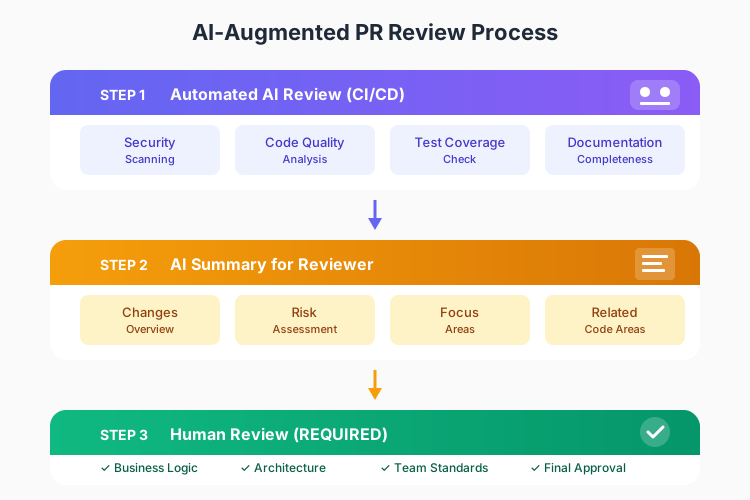
AI-Assisted Code Review Process
Knowledge Sharing with AI
Creating Searchable Team Knowledge
Document this solution for our team knowledge base:

Problem: [Description of the issue]
Context: [When/where this occurs]
Solution: [The fix we implemented]

Include:
- Root cause analysis
- Step-by-step solution
- Code examples
- Prevention measures
- Related issues/documentation
- Keywords for searchability
---
Part 8: Measuring AI Effectiveness
Key Metrics to Track
Tracking AI ROI
// Example: Tracking AI assistance metrics
interface AIMetrics {
  sessionId: string;
  timestamp: Date;

  // Usage metrics
  promptCount: number;
  tokensUsed: number;

  // Quality metrics
  suggestionsAccepted: number;
  suggestionsRejected: number;
  suggestionsModified: number;

  // Outcome metrics
  taskCompletionTime: number;
  bugsIntroduced: number;
  codeReviewCycles: number;
}

// Calculate ROI
function calculateAIROI(metrics: AIMetrics[]): ROIReport {
  const timeSaved = calculateTimeSavings(metrics);
  const qualityImpact = calculateQualityDelta(metrics);
  const cost = calculateAICost(metrics);

  return {
    netTimeSavingsHours: timeSaved,
    productivityMultiplier: timeSaved / baselineTime,
    qualityScore: qualityImpact,
    costPerHourSaved: cost / timeSaved,
    recommendation: timeSaved > cost ? 'POSITIVE_ROI' : 'EVALUATE',
  };
}
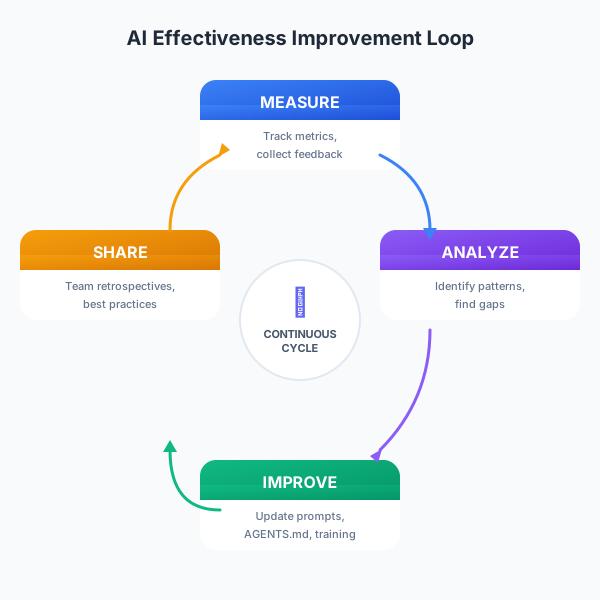
Continuous Improvement Loop
---
Part 9: Common Pitfalls and How to Avoid Them
Pitfall 1: Over-Reliance
Problem: Accepting AI suggestions without understanding them.
Solution:
Before accepting ANY AI-generated code:
1. Can I explain what every line does?
2. What are the edge cases?
3. What could go wrong?
4. Is this the right approach for our codebase?

If you can't answer these → Don't use the code
Pitfall 2: Context Poisoning
Problem: AI generates code based on incorrect assumptions.
Solution:
Always provide fresh, accurate context:
- Current file state (not outdated)
- Relevant type definitions
- Project conventions
- Known constraints

When AI goes off track:
1. Start a new conversation
2. Provide clean context
3. Be more specific about requirements
Pitfall 3: The Productivity Paradox
Problem: AI speeds up typing but slows down thinking.
Solution:
Design before generating:
1. Write pseudocode or comments first
2. Define interfaces and types
3. List edge cases to handle
4. THEN ask AI to implement

Time ratio guideline:
- 40% thinking/designing
- 20% prompting AI
- 40% reviewing/testing
Pitfall 4: Security Blind Spots
Problem: AI doesn't have security context.
Solution:
For any security-sensitive code:
1. Explicitly mention security requirements
2. Ask for threat modeling
3. Request OWASP compliance check
4. Get human security review

Red flags to watch for:
- Direct user input in queries
- Missing authentication checks
- Hardcoded credentials
- Disabled security features
Pitfall 5: Technical Debt Accumulation
Problem: AI generates working but non-optimal code.
Solution:
Include quality requirements in prompts:
- "Follow SOLID principles"
- "Use dependency injection for testability"
- "Keep functions under 20 lines"
- "No code duplication"

Schedule regular refactoring:
- Review AI-heavy code weekly
- Run code quality metrics
- Address technical debt in sprints
---
Part 10: The Future of AI-Assisted Development
Emerging Capabilities
Agentic Coding
AI that can autonomously:
Multi-Modal Understanding
AI that understands:
Specialized Models
Domain-specific AI for:
Preparing for the Future
Skills that become MORE valuable:
✅ System design and architecture
✅ Problem decomposition
✅ Code review and quality assessment
✅ Security and privacy expertise
✅ Domain knowledge
✅ Communication and collaboration

Skills to develop:
✅ Prompt engineering
✅ AI tool evaluation
✅ Human-AI workflow design
✅ AI output validation
✅ Ethical AI usage
---
Quick Reference: AI Development Cheat Sheet
Prompt Templates
Bug Fix
Bug: [description]
File: [path:lines]
Expected: [behavior]
Actual: [behavior]
Steps to reproduce: [steps]

Analyze the root cause and provide a minimal fix.
Feature Implementation
Feature: [name]
Requirements: [list]
Constraints: [list]
Related files: [list]

Implement following our patterns in [example file].
Code Review
Review for: security, performance, maintainability
Standards: [reference]
Focus areas: [specific concerns]

[code]
Refactoring
Current code: [paste]
Goals:
- Reduce complexity
- Improve testability
- Follow [pattern]

Maintain exact behavior. Include before/after tests.
The Golden Rules
---
Conclusion
AI-assisted development is not about replacing human developers - it's about amplifying their capabilities. The developers who thrive will be those who learn to effectively collaborate with AI: knowing when to leverage it, how to guide it, and when to rely on their own expertise.
This playbook provides the foundation. Your journey of mastering AI-assisted development is just beginning. Start with the basics, measure your results, iterate on your approach, and share your learnings with your team.
The future belongs to the AI-augmented developer. Welcome to the future.
---
Last updated: January 2026
Version: 1.0
Recommended Reading

The Pragmatic Programmer
by David Thomas
Timeless developer practices
As an Amazon Associate, we earn from qualifying purchases.
Clean Code
by Robert C. Martin
Writing maintainable code
As an Amazon Associate, we earn from qualifying purchases.

Building LLM Apps
by Valentino Gagliardi
Practical LLM development
As an Amazon Associate, we earn from qualifying purchases.
💬Discussion
No comments yet
Be the first to share your thoughts!