Beyond All-or-Nothing Deployments
Traditional deployments are binary: old version or new version. If the new version has problems, everyone is affected. Rollback is disruptive and slow.
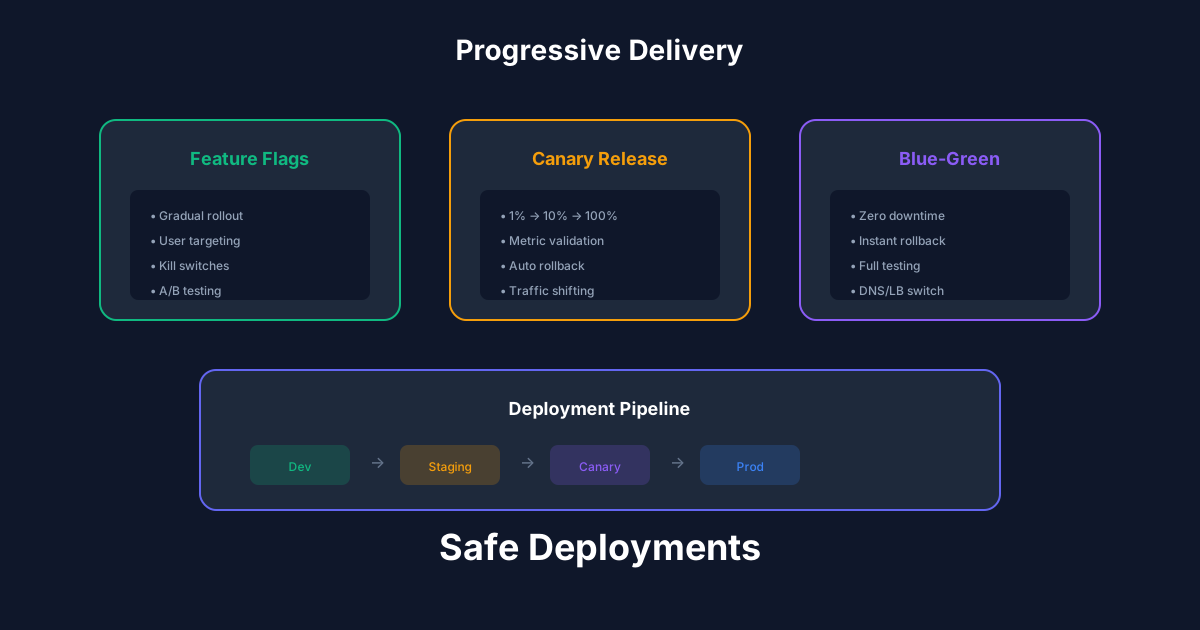
Progressive delivery changes this. Deploy to a small percentage of users, monitor, gradually increase. Problems affect few users and are caught early. Rollback is instant - just stop the rollout.
The Progressive Delivery Spectrum
Feature flags: Toggle features for specific users, cohorts, or percentages. Ship code without activating it. Enable for internal users first, then beta users, then everyone.
Canary releases: Deploy new version alongside old. Route small percentage of traffic to new version. Monitor metrics. If healthy, increase traffic. If not, route all traffic back to old version.
Blue-green deployments: Run two identical environments. Deploy to inactive environment, test, switch traffic. Instant rollback by switching back.
A/B testing: Route users to different variants to measure business metrics. Which checkout flow converts better? Statistical significance determines the winner.
Feature Flags Deep Dive
Feature flags separate deployment from release. Code ships to production but is inactive until the flag is enabled.
Use cases beyond simple toggles:
Choose a feature flag service (LaunchDarkly, Split, Flagsmith) or build your own for simple cases. The investment pays off in deployment confidence.
Canary Deployments in Practice
Canaries automate the rollout decision. Define success metrics (error rate, latency, business KPIs), deploy to small percentage, automatically promote or rollback based on metrics.
Tools like Flagger and Argo Rollouts integrate with Kubernetes. They manage the traffic shifting, run the analysis, and trigger rollback if metrics breach thresholds.
Key configuration decisions:
A/B Testing for Business Decisions
A/B testing answers business questions: Does this feature improve conversion? Does this copy perform better?
Requirements for valid A/B tests:
Do not peek at results early and stop when one variant looks better - that is p-hacking. Commit to sample size and duration before starting.
Best Practices
Recommended Reading
💬Discussion
No comments yet
Be the first to share your thoughts!