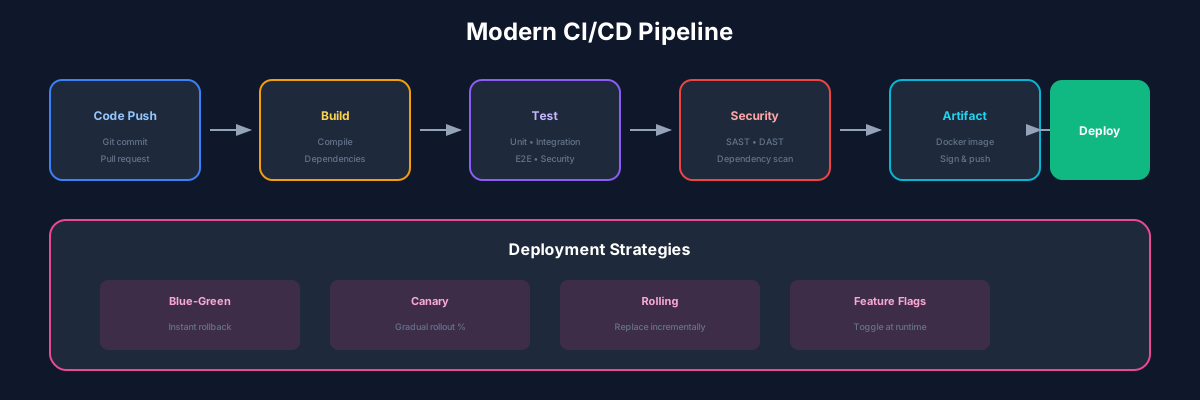
The CI/CD Revolution
Continuous Integration and Continuous Deployment (CI/CD) automate the software delivery process, enabling teams to ship faster with confidence.
CI vs CD
Continuous Integration (CI):
Continuous Deployment (CD):
GitHub Actions Deep Dive
GitHub Actions provides powerful, flexible CI/CD directly in your repository.
Complete CI/CD Workflow
YAML
name: CI/CD Pipeline

on:
  push:
    branches: [main, develop]
  pull_request:
    branches: [main]

env:
  NODE_VERSION: '20'
  REGISTRY: ghcr.io
  IMAGE_NAME: ${{ github.repository }}

jobs:
  test:
    name: Test & Lint
    runs-on: ubuntu-latest
    steps:
      - uses: actions/checkout@v4

      - name: Setup Node.js
        uses: actions/setup-node@v4
        with:
          node-version: ${{ env.NODE_VERSION }}
          cache: 'npm'

      - name: Install dependencies
        run: npm ci

      - name: Run linting
        run: npm run lint

      - name: Run tests
        run: npm test -- --coverage

      - name: Upload coverage
        uses: codecov/codecov-action@v3
        with:
          files: ./coverage/lcov.info

  build:
    name: Build & Push
    needs: test
    runs-on: ubuntu-latest
    if: github.event_name == 'push'
    permissions:
      contents: read
      packages: write

    steps:
      - uses: actions/checkout@v4

      - name: Login to Container Registry
        uses: docker/login-action@v3
        with:
          registry: ${{ env.REGISTRY }}
          username: ${{ github.actor }}
          password: ${{ secrets.GITHUB_TOKEN }}

      - name: Build and push
        uses: docker/build-push-action@v5
        with:
          context: .
          push: true
          tags: |
            ${{ env.REGISTRY }}/${{ env.IMAGE_NAME }}:latest
            ${{ env.REGISTRY }}/${{ env.IMAGE_NAME }}:${{ github.sha }}

  deploy-staging:
    name: Deploy to Staging
    needs: build
    runs-on: ubuntu-latest
    environment: staging
    if: github.ref == 'refs/heads/develop'

    steps:
      - name: Deploy to Kubernetes
        uses: azure/k8s-deploy@v4
        with:
          namespace: staging
          manifests: k8s/staging/
          images: |
            ${{ env.REGISTRY }}/${{ env.IMAGE_NAME }}:${{ github.sha }}

  deploy-production:
    name: Deploy to Production
    needs: build
    runs-on: ubuntu-latest
    environment: production
    if: github.ref == 'refs/heads/main'

    steps:
      - name: Deploy to Kubernetes
        uses: azure/k8s-deploy@v4
        with:
          namespace: production
          manifests: k8s/production/
          images: |
            ${{ env.REGISTRY }}/${{ env.IMAGE_NAME }}:${{ github.sha }}
Testing Strategies
Testing Pyramid
Automated Test Example
TypeScript
// Jest unit test example
describe('UserService', () => {
  it('should create user with valid data', async () => {
    const userData = { email: 'test@example.com', name: 'Test User' };
    const user = await userService.create(userData);

    expect(user.id).toBeDefined();
    expect(user.email).toBe(userData.email);
  });

  it('should throw on duplicate email', async () => {
    const userData = { email: 'existing@example.com' };

    await expect(userService.create(userData))
      .rejects.toThrow('Email already exists');
  });
});
Deployment Strategies
Blue-Green Deployment
Canary Releases
Rolling Updates
Best Practices
Conclusion
A well-designed CI/CD pipeline is essential for modern software delivery. Start simple and iterate based on your team's needs.
Recommended Reading
Recommended Read

The DevOps Handbook
by Gene Kim
How to create world-class agility and reliability
View on Amazon
As an Amazon Associate, we earn from qualifying purchases.
Recommended Read

Continuous Delivery
by Jez Humble
Reliable software releases through build, test, deploy automation
View on Amazon
As an Amazon Associate, we earn from qualifying purchases.
💬Discussion
🗨️
No comments yet
Be the first to share your thoughts!