The Kubernetes Cost Problem
Kubernetes makes it easy to deploy workloads. Too easy, perhaps - resources get requested and forgotten. Clusters grow without scrutiny. Before you know it, cloud bills are enormous and nobody knows why.
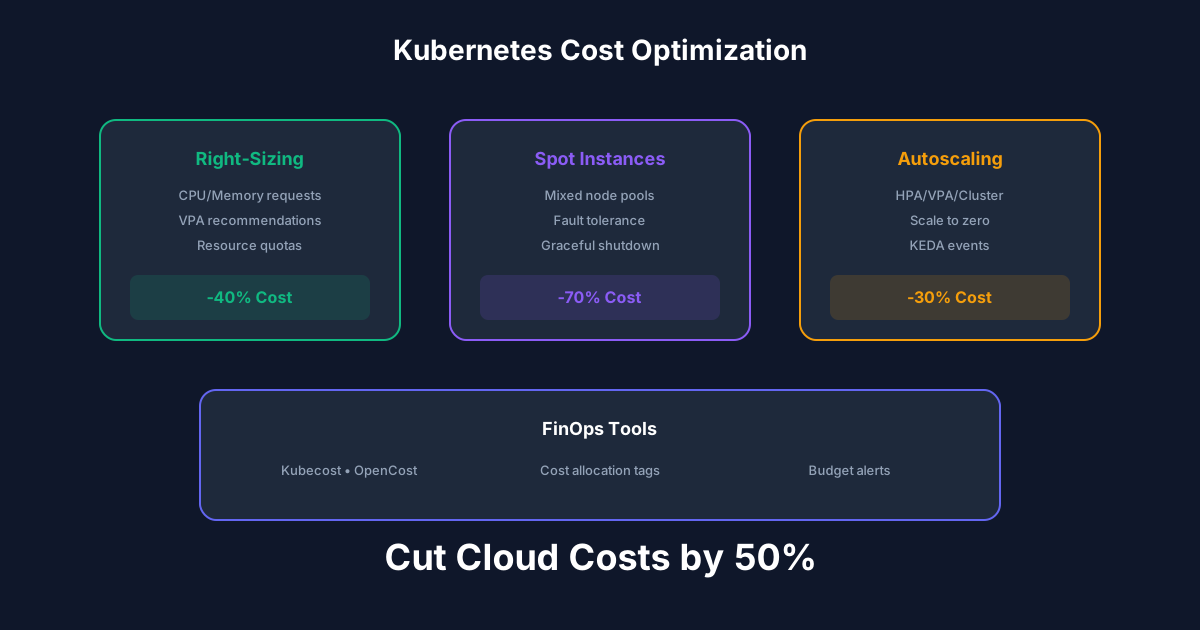
The typical Kubernetes cluster runs at 20-40% utilization. That means 60-80% of spending is waste. With proper optimization, 50% cost reduction is achievable without impacting performance.
Understanding Resource Requests and Limits
Requests are what the scheduler uses for placement decisions. If you request 1 CPU, the scheduler finds a node with 1 CPU available. Requests also determine your guaranteed resources.
Limits cap resource usage. Exceeding memory limits causes OOM kills. Exceeding CPU limits causes throttling.
The common mistake: setting requests equal to limits (guaranteed QoS) wastes resources. Set requests based on typical usage, limits based on peak usage. This enables bin packing - fitting more pods on fewer nodes.
Right-Sizing Strategies
Most teams guess at resource requirements, usually too high. Use actual metrics to right-size:
Vertical Pod Autoscaler (VPA): Analyzes historical usage and recommends (or automatically applies) right-sized requests. Start in recommendation mode to understand your workloads before enabling auto-updates.
Metrics analysis: Query Prometheus for actual CPU and memory usage over time. p95 usage is often 10-20% of requested resources.
Goldilocks: Open-source tool that runs VPA in recommendation mode for all deployments and provides a dashboard showing recommendations.
Spot Instances for Non-Critical Workloads
Spot instances cost 60-90% less than on-demand. The tradeoff: they can be terminated with little warning.
Good candidates for spot:
Use node affinity to prefer spot nodes while allowing fallback to on-demand. Configure Pod Disruption Budgets to maintain availability during spot terminations.
Autoscaling: Scale Down Aggressively
Cluster Autoscaler removes underutilized nodes. Default settings are conservative - tune for cost optimization:
Horizontal Pod Autoscaler scales pods based on metrics. Scale down quickly when load decreases. Consider KEDA for event-driven scaling.
Namespace Quotas and Limits
Without quotas, any team can consume unlimited resources. Implement:
Visibility creates accountability. When teams see their costs, they optimize.
Best Practices
Recommended Reading

💬Discussion
No comments yet
Be the first to share your thoughts!