Principles of Great API Design
A well-designed API is intuitive, consistent, and delightful to use. It enables developers to be productive and build great applications.
Core Principles
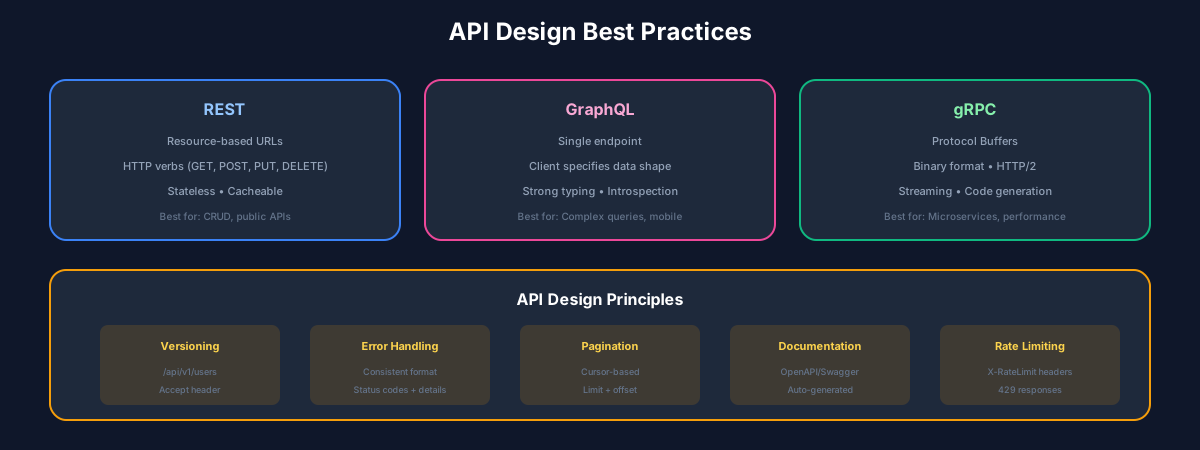
RESTful API Design
Resource Naming Conventions
Plain Text
# Good - Use nouns, plural forms
GET    /users           # List users
POST   /users           # Create user
GET    /users/{id}      # Get user
PUT    /users/{id}      # Update user
DELETE /users/{id}      # Delete user

# Good - Nested resources for relationships
GET    /users/{id}/orders
POST   /users/{id}/orders

# Bad - Using verbs
GET    /getUsers
POST   /createUser
HTTP Methods
Query Parameters
Plain Text
# Pagination
GET /users?page=2&limit=20

# Filtering
GET /users?status=active&role=admin

# Sorting
GET /users?sort=-createdAt,name

# Field selection
GET /users?fields=id,name,email

# Search
GET /users?q=john
Response Structure
TypeScript
// Success Response
{
  "data": {
    "id": "user_123",
    "name": "John Doe",
    "email": "john@example.com"
  },
  "meta": {
    "requestId": "req_abc123"
  }
}

// List Response with Pagination
{
  "data": [...],
  "meta": {
    "total": 100,
    "page": 1,
    "perPage": 20,
    "totalPages": 5
  },
  "links": {
    "self": "/users?page=1",
    "next": "/users?page=2",
    "last": "/users?page=5"
  }
}

// Error Response
{
  "error": {
    "code": "VALIDATION_ERROR",
    "message": "Invalid input data",
    "details": [
      {
        "field": "email",
        "message": "Must be a valid email address"
      }
    ]
  }
}
GraphQL Best Practices
Schema Design
GRAPHQL
type User {
  id: ID!
  email: String!
  name: String!
  avatar: String
  posts(first: Int, after: String): PostConnection!
  createdAt: DateTime!
}

type Post {
  id: ID!
  title: String!
  content: String!
  author: User!
  comments(first: Int): CommentConnection!
}

type Query {
  user(id: ID!): User
  users(first: Int, after: String, filter: UserFilter): UserConnection!
  post(id: ID!): Post
}

type Mutation {
  createUser(input: CreateUserInput!): CreateUserPayload!
  updateUser(id: ID!, input: UpdateUserInput!): UpdateUserPayload!
}

input CreateUserInput {
  email: String!
  name: String!
}

type CreateUserPayload {
  user: User
  errors: [UserError!]
}
API Versioning
Strategies
/v1/users, /v2/usersAccept: application/vnd.api+json;version=2/users?version=2TypeScript
// URL versioning example
app.use('/v1', v1Router);
app.use('/v2', v2Router);

// Header versioning middleware
app.use((req, res, next) => {
  const version = req.headers['api-version'] || '1';
  req.apiVersion = parseInt(version);
  next();
});
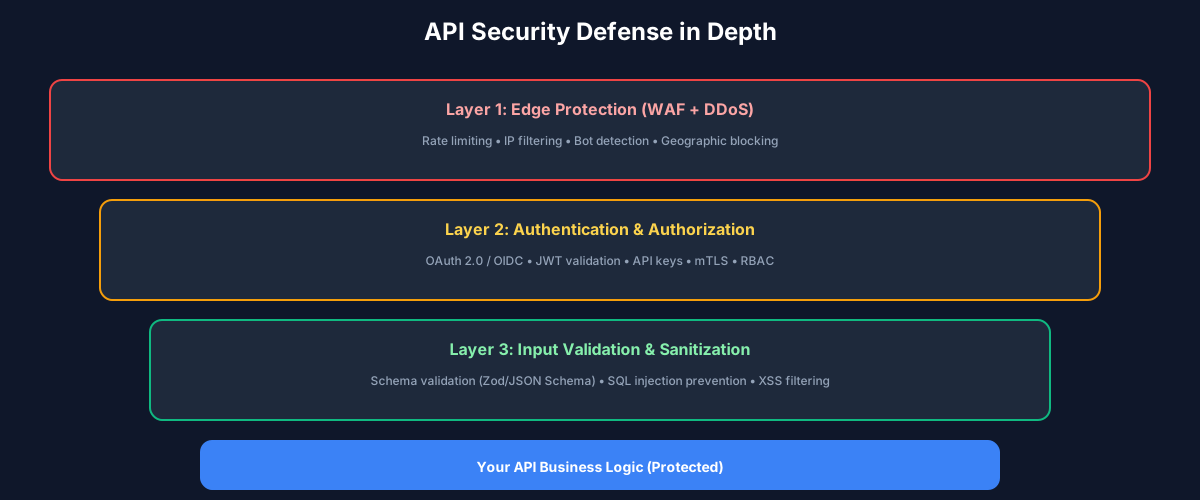
Authentication & Authorization
OAuth 2.0 / JWT
TypeScript
// JWT token structure
const payload = {
  sub: 'user_123',           // Subject (user ID)
  iat: 1704067200,           // Issued at
  exp: 1704153600,           // Expiration
  scope: ['read', 'write'],  // Permissions
  aud: 'api.example.com'     // Audience
};

// Middleware
const authenticate = async (req, res, next) => {
  const token = req.headers.authorization?.split(' ')[1];

  if (!token) {
    return res.status(401).json({ error: 'Unauthorized' });
  }

  try {
    const decoded = jwt.verify(token, process.env.JWT_SECRET);
    req.user = decoded;
    next();
  } catch (error) {
    res.status(401).json({ error: 'Invalid token' });
  }
};
Rate Limiting
TypeScript
// Rate limit headers
{
  'X-RateLimit-Limit': '1000',
  'X-RateLimit-Remaining': '999',
  'X-RateLimit-Reset': '1704067200'
}

// 429 Too Many Requests response
{
  "error": {
    "code": "RATE_LIMIT_EXCEEDED",
    "message": "Too many requests",
    "retryAfter": 60
  }
}
API Documentation
Use OpenAPI/Swagger for comprehensive documentation:
YAML
openapi: 3.0.0
info:
  title: User API
  version: 1.0.0
paths:
  /users:
    get:
      summary: List users
      parameters:
        - name: limit
          in: query
          schema:
            type: integer
            default: 20
      responses:
        '200':
          description: Successful response
          content:
            application/json:
              schema:
                $ref: '#/components/schemas/UserList'
Conclusion
Great API design is an investment that pays dividends in developer productivity and adoption. Follow these principles to build APIs that developers love.
Recommended Reading
Recommended Read

API Design Patterns
by JJ Geewax
A comprehensive guide to designing robust APIs
View on Amazon
As an Amazon Associate, we earn from qualifying purchases.
Recommended Read

RESTful Web APIs
by Leonard Richardson
Services for a changing world
View on Amazon
As an Amazon Associate, we earn from qualifying purchases.
💬Discussion
🗨️
No comments yet
Be the first to share your thoughts!